

A month ago I was the guest in the Hot Seat of “Die Copilot Show” and in 20 minutes I showed 6 basic and 6 advanced use cases. I started with Copilot Chat and custom instructions and ended with Skills in PowerPoint and Copilot Cowork.
It was fun. And it was exactly what I would never recommend to a company: Feature Tourism.
On LinkedIn and on a show like this, I’m your Feature Tour Guide. In Copilot projects, I’m the Impact Architect. Both have their place. Showing what Copilot can do creates awareness. But if a rollout stops there, people see twelve features and can’t transfer a single one to their own work. Twelve “nice” moments, not one new habit, and then the CxO asks for the return on investment.
You need aha moments to see the value, and those come from use cases you know from your own day. What turns them into habits is a training plan in stages, where every stage builds on the one before. I wrote about the difference in Episode 102.
Have you missed last week’s episode? Here’s my summary in 5 minutes (in German).
06:00, before my day starts
Every day I go to the gym or go running before work, so my workday starts between 06:30 and 07:30. When I sip my protein shake and sit in front of my laptop, Copilot has already worked for me, because my Copilot also starts at 6am, while I work out.
At 06:00 a scheduled prompt sorts my emails into categories. Standard Copilot, not a single extra credit. (Try it yourself)
At the same time, a Cowork automation runs my Chief of Staff skills: open tasks in Planner, unread messages, what needs me today. At the end of the day, another skill goes through all my meeting transcripts and puts my tasks into the right Planner board or just updates the existing ones.
When I show this, the question is always the same: “How do you do that?”
It wasn’t a Chief of Staff skill combined with Copilot Cowork from day one (of course not, Cowork didn’t exist back then), and it also didn’t start as an agent. It started as a prompt I typed every morning. How it got from there to here, I’ll show you in stage 5.
That’s the whole episode in one line. Skills & Agents belong in the basics, but as the last steps, not the first.
Both skip the middle
Most Copilot trainings explain what Copilot can do and “how to prompt”. People learn to ask better questions, and that’s it. Most agent programs start at the top. Someone wants an agent for the service desk before anyone on that team has written a custom instruction.
Both skip the middle. And the middle is where the value is.
So two things belong in the basics today.
Skills, because they’re generally available and they’re where repeated work turns into technique.
And agents, as the last stage, not the first.
In the gym you don’t start with the heaviest weight. But a training plan that never gets there isn’t a plan either. Five stages:
Set up: a Copilot that knows who you are
Ask: you work, Copilot helps (Chat)
Delegate: you hand over, Copilot works (Cowork)
Repeat: what you do again becomes a skill
Build: your first agent or automation, made from your skills
Stage 1: Set up (20 minutes)
Work IQ already knows your work: your mails, meetings, files and network. What it doesn’t know is you. You find the settings under Settings → Personalization in Copilot Chat.
Custom instructions
I’m sure that for more than 70% of users this field is still empty, and it takes 15 minutes max. Your role (Work IQ knows it), your language, your format, what’s “good” for you. Mine tells Copilot to start every answer with an executive summary.
Shortcut: let Copilot and Work IQ write the first draft, then cut it down to what’s really you. Here’s a prompt for you, just copy & paste it into your Copilot:
Analyze how I work, based on my emails, meetings, Teams chats and documents from the last four weeks. Then draft my custom instructions for Microsoft 365 Copilot.
Step 1: What you see
Summarize in up to eight short bullets:
- my role and what I'm responsible for
- the topics and projects that take most of my time
- who I work with most (roles or teams, no names)
- the languages I write in, and when I use which
- how I write: tone, length, structure, how I open and close
- the outputs I produce again and again (reports, decks, proposals, minutes)
- what a typical week looks like (meetings, focus time, recurring tasks)
For each bullet, say where you saw it: email, meeting, chat or file. If my data doesn't show something clearly, say so instead of guessing.
Step 2: Draft my custom instructions
Write them in the first person ("I'm…", "When I ask…"), in the language I use most at work, in no more than ten short lines:
- who I am and what I work on
- language rules
- how every answer should start (for example: executive summary first) and how long it should be
- tone and format
- what you should always do (for example: name the source document)
- what you should never do
Only keep lines that change your answers. Leave out anything you do anyway. No customer names, figures or other confidential details.
Step 3: Check with me
Ask me up to three questions where my way of working isn't clear from the data. Don't save anything to memory. I'll review the draft and paste it in myself.
Saved memories
Things you tell Copilot to remember stay until you delete them. Once a month, ask “What do you know about me?”. Set it up as a scheduled prompt every month:
“What do you know about me, and what is saved in your saved memory?”
Chat history
Copilot also learns from your past chats. Good to know: deleting a saved memory isn’t enough if chat history stays on, because Copilot can learn the same thing again. If you don’t want to save it in your history, use a temporary chat.
Work data and web content
The Work IQ button at the top left of Chat switches your work data on or off. Web content sits under Personalization → Advanced settings. Know which mode you are in before you trust an answer about an internal decision. Sometimes you do not want to have this internal bias, so just turn off Work IQ and you access only web content.
The model
For most people here: Leave it on Auto. Select it specifically if you’re sure which model is best for your task, otherwise let Copilot handle it.
Congrats, stage 1 is already completed. Wasn’t that hard, right? Actually it was just two things to do from your side, the others were more informational and basic knowledge. Let’s move on to stage 2.
Stage 2: Ask (Copilot Chat)
Access isn’t fitness. So to become AI-fit you need to change the way you think and change how you use AI. Always start by asking yourself:
How can Copilot help me here?
In Copilot Chat, you work and Copilot supports you. It’s a back-and-forth conversation. You work collaboratively with Copilot and you stay in the process. Here are 4 basic use cases you can start using today:
1. Start your day with Copilot.
“What happened since last night, and what needs an answer from me today?”
Copilot doesn’t know your priorities, so tell it which projects matter.
2. Meeting prep.
“Prepare me for the 10:00 with [customer]: Based on the last emails & Teams conversations, documents for project X, open tasks from the last meeting.”
Only as good as what lives in Microsoft 365. Remember this one, it comes back.
3. Summarize the document(s).
“What are the key insights in this document?” or “Summarize this /[presentation] based on our discussion /[meeting] and this /[email]”
Copilot can handle multiple references and connections really, really well. Use it!
4. Before, during and after the meeting.
“What are open questions in the meeting?” or “What was decided, what are my tasks, what stayed open?”
Absolute standard rule for you from now on: a transcript for every meeting (if everyone agrees). In a first meeting I always ask before I start it, or I write it directly in the meeting invite.
Stage 3: Delegate (Copilot Cowork)
Chat answers your questions. Cowork delivers your requests. For the last three years we were busy learning how to prompt. With Cowork we took the next step. We need to formulate our ultimate goal, and Cowork creates its own plan to achieve it.
My Chat or Cowork cheatsheet has the three questions that decide the mode.
The most common mistake I see: people use Cowork like they used Copilot Chat. Then it becomes an expensive chat window, literally, because Cowork runs on usage-based billing. Before you hand anything over, write down four things:
Result: what is on the table at the end?
Inputs: where is the material?
Acceptance: how do you know it’s good enough?
Scope: where does the task end?
Here are three Copilot Cowork tasks to start with:
The same task, twice. Take use case 2 from Stage 2 again, but hand it over:
“Create a briefing dossier for the /[meeting] with [customer] on [day]: emails from the last 30 days, the documents in /[folder], open opportunities. Result: an HTML dashboard with situation, three risks, three questions I should ask. Send the result as a Teams message to /[person] and me.”
In Chat you got an answer. In Cowork you get a result.
The weekly report.
“Write the weekly report for project [X] from the Teams channel, mails and Planner: progress, risks, decisions, next week. Same format as last week.”
That only works if last week exists as a template. Keep this one in mind for stage 4.
Work through the inbox.
“Go through all open customer mails of this week: categorize, draft replies in my tone, list where I have to decide myself.”
By default Cowork asks for your approval before it sends anything, keep that default.
Of course these are super easy ones to start with. Make sure to keep the effort bar on light for the first time and start exploring to turn it up a bit. Reminder: every task you’re running creates costs. You can always check your usage with /cost.
Here’s my LinkedIn Learning course about Cowork (it’s from April, but the key concepts are still valid. Quite soon I’ll re-record it to have the latest and greatest included).
Stage 4: Repeat (skills are basics now)
A few months ago, skills in Copilot were a Frontier topic. Since June they’re generally available in Cowork, so for me they’re basics now. Everyone needs to know why skills are relevant, how to use them and also how to build a skill. That’s why they were part of my twelve at the show.
Think of it like this: Skills are your recipe to cook outstanding menus. You (or your agents) are the cook.
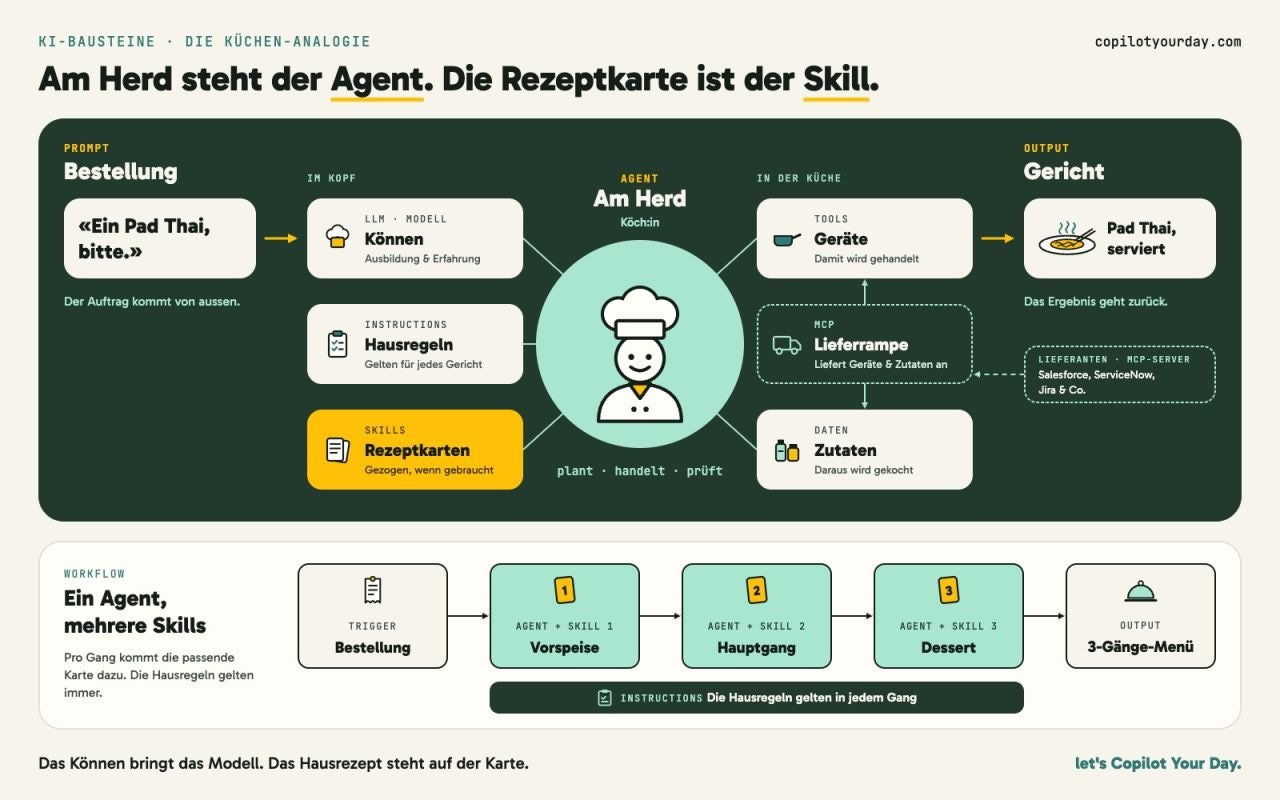
A skill is a small file with a name, a description and instructions. Copilot loads it when the description fits the task.
My one rule: no skill for something Copilot already does in one prompt.
Turn the weekly report into a skill.
“Help me turn the weekly report into a skill: format, sources, tone, acceptance criteria.”
Next Friday it runs without a long prompt. Once you’ve run it with the result you need, use
/skillsin Cowork and tell it you want to have this as a skill.One skill for your craft. I built 50 PowerPoint skills for my consulting work. One checks a storyline, one sharpens slide clarity, one suggests how to visualize a point.
Put it on a schedule.
The Automations page in Cowork runs scheduled prompts and event-driven tasks, for example when a matching email arrives. That’s how my morning routine runs, more on that in stage 5.
Share one skill with one person. A skill that works for you meets other templates and other permissions with your colleagues. Test it with one person before the whole team.
Stage 5: Build (your first agent or automation)
Remember my morning routine? You have different ways to build your approaches:
Use scheduled prompts in Copilot Chat or automations in Copilot Cowork
Build an agent that acts as a cook and creates amazing food: a combination of skills, LLM power and third-party connections (MCP).
My daily morning briefing didn’t start with the perfect automation. It was explorative and I redesigned it many times because Microsoft offers new ways to do it. It all started with a manual prompt every morning, then I switched to scheduled prompts. The output wasn’t that sexy back then, because I needed to type many steps manually. I extended it to other aspects like Planner information or unread messages. Then I put it into an agent. After my agent went live, Microsoft enabled the concept of skills, so I switched again. A few weeks ago it became a skill and then it became a skill pipeline, and today it’s Cowork + Skill, with a Teams message to me every morning.
So yes, my last step wasn’t an agent in the end. The agent was a stop on the way. That’s the point of stage 5: build something that works for you, even while you’re in the gym. Sometimes that’s an agent, sometimes it’s Cowork + Skills.
Long story short: Start rethinking how you work. Start with the easiest solution and test if it works for you. If it does, start building it in a way that it starts working for you.
There are so many possible solutions.
Prompt
Scheduled prompt
Agent Builder
Agent in Copilot Studio
Copilot Cowork
Skills
Autopilot
…
I know it’s overwhelming, but trust me: just start with a single prompt, optimize it, and once it works, start to build it.
If you need a kick start to build your first agent with Agent Builder, use my LinkedIn Learning course.
What this means for your rollout
If you are responsible for Copilot in your organization, here is what I would do:
Remember my claim: Access isn’t fitness. You can have a gym membership and never become fit, because you haven’t built a new routine. The same applies to AI transformation in your organization. Start connecting Copilot features with the daily use cases your employees have. To start right, ensure they master the basics.
Want to make it easy for your people? Then start with my LinkedIn Learning courses. You’ll find role-specific courses and basics.
Basics
Role-specific
On a personal note
In ice hockey, you don’t skip skating drills because you can already shoot. The players who last are the ones still doing the boring drills in October.
But nobody trains drills forever. At some point you play the game. Your first agent or automation is that moment: small, your own, and built on every drill before it.
Access isn’t fitness. But fitness is trainable, all the way to your first agent.
See you next week! Your Copilot Your Day Captain 😎
FAQ
AI-generated frequently asked questions and its answers
What are the basics of Microsoft 365 Copilot?
Pascal Brunner-Nikolla describes the basics as a training plan with five stages: set up Copilot (custom instructions, memory, chat history, work data, model), ask in Copilot Chat, delegate whole tasks in Copilot Cowork, repeat by turning recurring work into skills, and build something that works for you, such as a scheduled prompt, a Cowork automation or an agent. Every stage builds on the one before. Skills count as basics because they are generally available in Copilot Cowork since June 2026.
What is Feature Tourism in Copilot adoption?
Feature Tourism means showing what Copilot can do, feature by feature, without connecting it to people’s own work. It creates awareness, but employees see the features and can’t transfer them to their daily tasks, so no new habits form. Pascal Brunner-Nikolla contrasts it with Impact Architecture: connecting Copilot capabilities to real use cases and training them in stages.
How do I write good custom instructions for Copilot?
Custom instructions take about 15 minutes. Describe your language, your format and what a good answer looks like for you, for example that every answer starts with an executive summary. Copilot already knows your role from your work data. A quick start is to let Copilot analyze your emails, meetings, chats and documents and draft the instructions, then cut the draft down to what really fits you.
What is a skill in Microsoft 365 Copilot?
A skill is a small file with a name, a description and instructions. Copilot loads it when the description fits the task. Pascal Brunner-Nikolla compares skills to recipes: the skill is the recipe, and you or your agents are the cook. His rule: no skill for something Copilot already does in one prompt.
Should beginners build Copilot agents?
Yes, but as the last stage of basic training, not the first. Start with a single prompt, optimize it, and build only once it works: as a scheduled prompt, a Cowork automation with skills, or an agent. Pascal Brunner-Nikolla’s own morning briefing went from a manual prompt to scheduled prompts, then an agent, and today runs as Cowork with skills.
What is the difference between Copilot Chat and Copilot Cowork?
Copilot Chat answers your questions: you work with Copilot in a back-and-forth conversation and stay in the process. Copilot Cowork delivers your requests: you formulate the goal, and Cowork creates its own plan and returns a result. Cowork runs on usage-based billing, and you can check the approximate credit usage of a task by typing /cost.
From the archive


Take it with you
Personalisation in Copilot. Stage 1 on one page: what goes into your custom instructions, how to use memory, and the control question for once a month. copilotyourday.com/cheatsheets/personalise-copilot
Chat or Cowork? The three questions that decide the mode before you start a task. copilotyourday.com/cheatsheets/chat-or-cowork
Prompt, Skill, Agent or Flow? The decision tree for stages 4 and 5: when a prompt is enough, when it becomes a skill, and when an agent is worth it. copilotyourday.com/cheatsheets/prompt-skill-agent-or-flow