

A year ago, everyone is talking about agents. Every AI request that was a bit more than the standard resulted in an agent. When we think about agents there’s a big spectrum, from very basic retrieval agents (let’s be honest, we can call it a masterprompt) to super complex multi-agent system.
An important update for all my German readers! From now on, I will publish a five-minute summary of this newsletter every Sunday, narrated by an AI voice clone of myself.
Here is last week’s episode.
One particular issue was that we needed to create an agent for everything. This resulted in hundreds of agents, even though agents didn’t really feel great to specific use cases, because it was more describing than actually running in a sense of agents. Furthermore we had the issue, that some processes are quite similiar, but with a different context, this leaded to create multiple agents for similiar aspects.
But for a while Anthropic introduce the concept of skills. Which is in my opinion really great! And this episode we cover all you need to know about Skills, with a specific focus on Skills in the Microsoft Copilot Platform.
This episode might seem a bit technical. However I highly recommend to keep reading, since the concept of skills is super relevant for the AI journey.
What a skill is, in one minute
A skill is a folder. In its simplest form there is one file in it, called SKILL.md. At the top there are two fields, a name and a description. In addition there can be optional fields as well. Below that come the instructions in plain Markdown. That’s already a working skill.
---
name: pdf-processing
description: Extract PDF text, fill forms, merge files. Use when handling PDFs.
license: Apache-2.0
metadata:
  author: example-org
  version: "1.0"
---
But a skill can grow. The format knows three optional subfolders: scripts/ for code the skill can run, references/ for documents it can look things up in, and assets/ for templates and other files it works with. So the range goes from a few lines of text to a small package with your report template, your style guide and a script that checks the result.
skill-name/
├── SKILL.md          # Required: metadata + instructions
├── scripts/          # Optional: executable code
├── references/       # Optional: documentation
├── assets/           # Optional: templates, resources
└── ...               # Any additional files or directories
Most people start with the simple kind. The bigger ones are where it gets interesting for a whole team. They are also where IT should look closer, because scripts are code. And how much of this an app supports differs, more on that below.
The description matters most. At the start of a session Copilot only reads the name and the description of each skill. It loads the full instructions when a task matches, and the files in the subfolders only when the instructions call for them. So a vague description means your skill never fires, however good the rest is.
I once put it like this: a skill is a verb, an agent is a role. A skill describes how to do something. An agent has its own instructions, knowledge and tools. I still use it as a memory aid, but it's my shorthand. The most common analogy is the one with a gourmet kitchen. Of course, we need a gym metaphor:
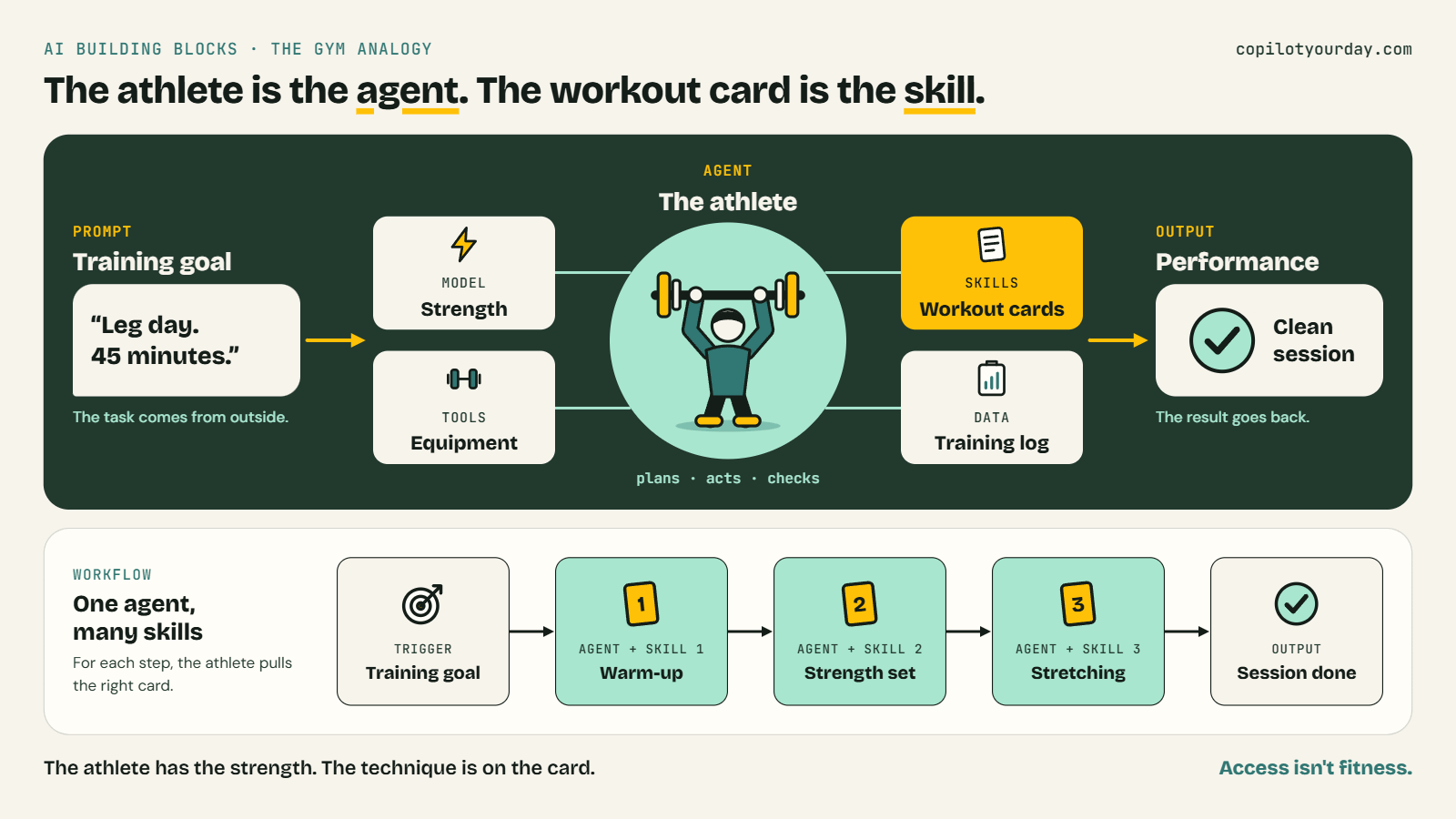
The map: Where skills live today
Status as of October 6, 2026. Message Center posts aren’t public, so those links go to mirror sites.
Generally available
In Copilot Cowork, custom skills came with general availability on June 16, 2026. The file sits in your OneDrive under
/Documents/Cowork/skills/. You can have up to 50 custom skills, and Cowork scores each one from 0 to 100.In SharePoint, site skills live in the Agent Assets library of the site. The GA rollout ran from mid-June to early July 2026. Anyone with Edit rights on the site can create one, anyone with View rights can use it.
In PowerPoint, personal custom skills sit in a skills folder in your OneDrive. Message Center announced GA from late July. The Learn release notes list it for the web on September 23 and for Windows on October 6. It’s available by default.
In Excel, prebuilt skills have been GA since June 25, 2026. Custom skills were announced for the month after, but I couldn’t find a Microsoft page that confirms the rollout is complete.
For your developers, GitHub Copilot has supported skills since December 2025, and VS Code has had them GA and on by default since version 1.109 in February 2026.
In Frontier (Preview)
In Agent Builder, Learn still says preview and Frontier only. You can add up to eight skills per agent, and reusing a skill across agents isn’t supported yet. A Message Center post from September 23 announces GA by the end of September, at least at my tenants are not yet GA.
In PowerPoint, organisation skills are in Frontier. Admins deploy them through the Microsoft 365 admin center.
In Copilot Studio, skills work only for agents on the GitHub Copilot harness. The skills entry in What’s new carries no status label, neither preview nor GA.
In Copilot Chat, Message Center announces “Agents and Skills” that you insert with “/” or “@” , with a GA rollout from mid to late September. Which skills show up there isn’t documented and it’s neither accessible in my tenants yet.
I know it’s alot, but no worries, here’s my skill map
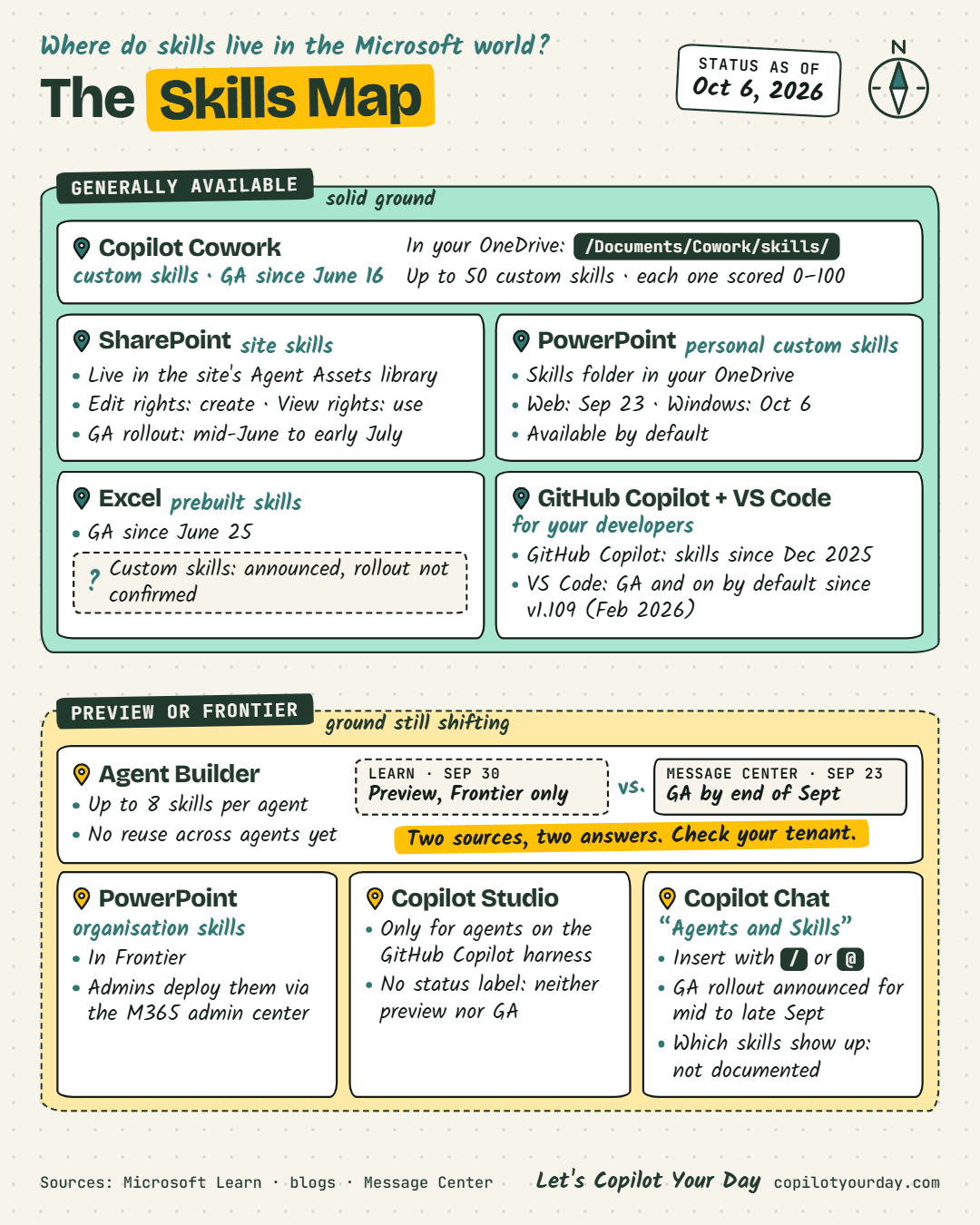
Same concept, different rules, different place
This is one of the hardest things these days, there’s no one single place for single, but it’s rather individual per approach. With that said, also different limitations. For example Coworks & Power Point allows you up to 50 indiviudal skills, Agent Builder allows only 8 skills per agent.
So "we have skills now" means something different in every app. If you're writing your first one, decide first who needs the result. That tells you where it belongs.
💡 Quick break between sets: Between Mondays, I post daily on LinkedIn. Hands-on tests, frameworks and everything that doesn't fit into a newsletter. Follow me there if you want more of it.
"How do we roll out skills to 500 people?"
That’s the question people ask me after I showed them the possibilities with skills.
Unfortunately, my response is like a good consultant is responing:
It depends!
Jokes aside, but it really depends 😁 Because, which skill do you mean? The ones in Cowork? in PowerPoint? SharePoint or do you mean the skills for Agents? Ah and when it’s the ones for agents, do you mean Agent Builder or Copilot Studio with Github Copilot Harness.
Well, well, well: as you see, skills didn’t come with one big launch. They came app by app, or let’s say product group by product group.
However as far as I know Microsoft, there will be new governance and lifecycle controls coming for Skills to deploy the skills across the apps (as far it’s useful). But for the moment, it’s a little mess. (but still too good to not start with skills and wait till everything works super smoothly)
Three decisions and one date
Back to the 500 people. The map leaves you with three decisions.
Who owns a skill once it leaves one OneDrive?
A personal skill has an owner by definition. A packaged skill has the admin center. In between sits “shared with specific users”. There the recipients only get a new version when the author re-shares it. Somebody has to be that author, also in a year.
Which road leads to 500?
Today the documented road is the package. A plugin bundles skills and connectors, an admin scopes it to groups, and IT can see it and block it. Organisation skills in PowerPoint take the same road. For Copilot Studio, a skill catalog for approved organisational skills is on the roadmap (ID 571880), with GA estimated for October 2026 (which is now 😁).
I’ve been describing three levels for skills: personal, shared, packaged. The levels exist. But they sit side by side, and not every app has all three.
What’s your rule for skills from outside?
The format is open, so skills travel. Cowork even converts a Claude plugin package when you upload it. It also scans a new skill for risky code and prompt-injection patterns. But packages you distribute in your own tenant “don’t go through Microsoft 365 App Store validation.” So who reads a skill before 500 people run it? That one is yours to answer, and you better have a clear answer.
And the date
Message Center MC1484008 from October 1 announces a plugin registry across Chat, Cowork, Code, Autopilot and the Office apps. By late November, the buttons “Agents”, “Agents & Skills” and “Customize” become one button called “Plugins”. If you’re building training material right now, don’t build it on button names.
Does a skill make Copilot better?
Microsoft hasn't published any usage or impact numbers for skills, at least none that I could find. But let’s think about it: In general that’s not a magic source, that solves every issue. However in my personal experiences, it makes Copilot indeed better.
Prompts are reps. Skills are technique.
And bad technique, repeated 500 times, is still bad technique.
How I started to use skills.
I’m quite amazed by skills, it delivers an additional layer to your AI usage. I started by exploring agentskills.io, which is the official skill standard. Read through the website and have a look at the examples.
Once you have a first idea for a skill, open Copilot and ask Copilot to create a skill together with you. If you have access to Copilot Cowork, you can use the skill /skill to create a new skill (you see a great skill-use-case is to create new skills 🤭). Rather start with one or two skills and not directly start with hundreds.
and reminder: Access isn’t fitness.
Writing the file is access. Running it the same way every week, with an owner behind it, is fitness.
Let’s Copilot Your Day! 🔥
Read on in the archive


Copilot Cowork: Everything You Need to Know: the hands-on baseline, including the first look at custom skills.
Agent 365 is GA: the control plane for agents, and a good way to see what it doesn’t cover yet for skills.
Take it with you
Prompt, Skill, Agent or Flow? (Cheatsheet): the decision before you write anything, on one page.
Agent Skills specification: the open format, if you want the exact field rules.
FAQ about Skills in Microsoft
AI-generated FAQ section
How do we roll out Copilot skills to 500 people?
The documented road today is the package. A skill that is distributed as a plugin or app package is managed in the Microsoft 365 admin center under Agents > Tools, where admins can scope it to users or groups and block it. Start with the skills that already work in your teams, give each one an owner, and package those.
What is a skill in Microsoft 365 Copilot?
A skill is a reusable method for Copilot, packaged as a folder with a SKILL.md file. The file starts with a name and a description, followed by instructions in Markdown. A simple skill is just this one file, while a bigger one adds subfolders with scripts, reference documents and templates. Copilot reads only the name and description at first and loads the rest when a task matches.
Where are Copilot skills stored?
It depends on the app. In Copilot Cowork, custom skills are stored in the user’s OneDrive under /Documents/Cowork/skills/. SharePoint site skills are stored in the Agent Assets library of the site, and PowerPoint keeps personal skills in a skills folder in the user’s OneDrive. As of October 2026, Microsoft documents storage separately for each app.
What’s the difference between a skill and an agent?
A skill is a written-down method: how to do one task, step by step. An agent is a separate unit with its own instructions, knowledge and tools, and it can load skills. Pascal Brunner-Nikolla’s shorthand is “a skill is a verb, an agent is a role.”
Can IT control or switch off Copilot skills centrally?
Partly. Skills that are distributed as a plugin or app package are managed in the Microsoft 365 admin center under Agents > Tools, where admins can install, scope, block and approve them. For skills that users create themselves, Microsoft documents no tenant-wide switch.
Are Copilot skills the same as People Skills?
No. People Skills is a Microsoft 365 service that builds skill profiles of employees, so it describes people. The skills in this episode are SKILL.md files that describe a method for Copilot. The Skills agent, which was built on People Skills, was retired at the end of March 2026 according to Message Center post MC1243548.