

The next Copilot evolution is coming. Be ready for it, it will be great.
For more than 3.5 years, Microsoft has been driving the AI transformation. From the very beginning, Microsoft positioned Copilot as the one interface to AI, and Satya Nadella later called it “the UI for AI”. I truly believed from day one that Microsoft will win this race (also read “Microsoft Losing the AI Race? We’ve Been Here Before.“), while at the same time so many people laughed at Microsoft.
After every model launch, people pointed at Microsoft and said how bad they are and that other providers are so much better. And of course they were (and sometimes still are) better than Microsoft. But most people miss one aspect: the deep integration into the tools you work with day in and day out. And they miss that Copilot doesn’t depend on one model provider. Copilot is multi-model. Today that means models from OpenAI and Anthropic, with more labs and open-weight models coming, as Microsoft wrote last Friday.
Hey, are we already connected on LinkedIn? Follow me for daily AI, Copilot & Agents Insights
Throughout these 3.5 years, Microsoft never hesitated to rename products, stop some approaches and after a few months, consolidate the innovative ones into one bigger approach, while keeping the innovation. I know many of you are struggling with these changes and are constantly rethinking your approach. But that’s what it’s all about: we’re all on an exciting journey, using tools that didn’t exist in the same way 6 or 12 months ago. Of course, we need to revalidate and reimagine how we work with these tools. This also means that renames or new approaches are sometimes necessary to get the most out of them.
And let me say one thing: the announcement from September 25th feels like the start of the next Copilot era.
The “Super Copilot App” is coming, indeed!
Copilot is ready for the next generation. It combines your daily AI companion with Code capabilities and Autopilot. Everything just one fingertip away.
What’s inside the Super Copilot App
Well, buckle up, Copilot become three toggles to switch.
Copilot gets a new Home
You know “Home” from Windows for so many years. Now let’s move your home experience to Copilot, because the Copilot app gets a Home as well. It combines Copilot Chat and Cowork in one place. In the future, you don’t even have to think about whether you should switch to Cowork or not. Copilot will route your request to the right mode automatically (Chat or Cowork).
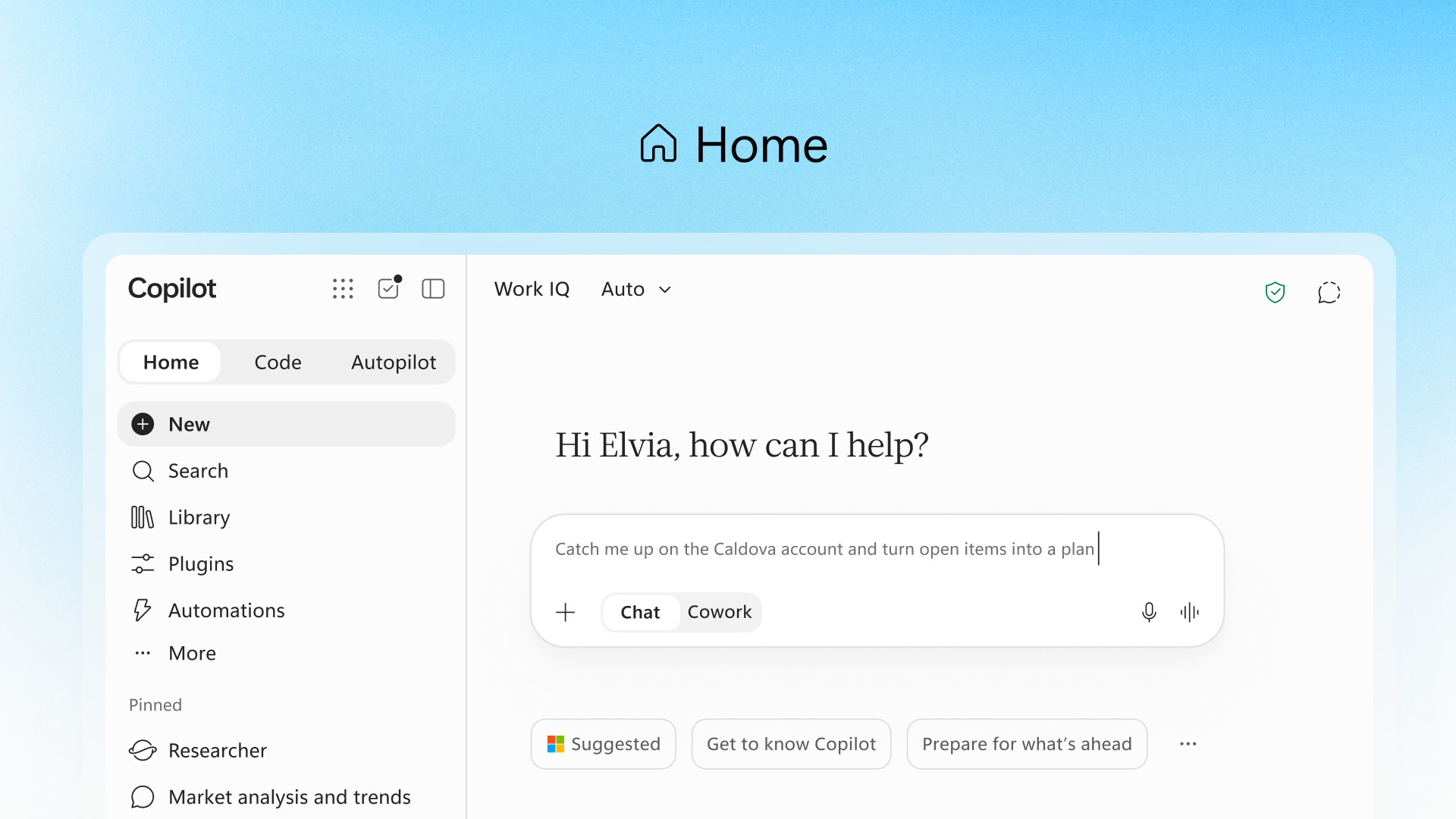
With that, Home also gets the power of Office in Copilot. Did you feel the power of the latest brand kit and skills capabilities in PowerPoint? If you haven’t tested them yet, you have to. It’s really starting to become “useful” for your presentations. And with Office in Copilot in the app, you can just “@mention” your teammate and stay in sync between Copilot and the Office apps. Your progress travels with you wherever you work.
Home starts rolling out in the Frontier program in the coming weeks.
Code will be a fundamental skill for knowledge workers
If you’re using Claude regularly, you may already use the “Code” section (same in ChatGPT with Codex). And yes, it’s also coming to Copilot. A first indicator was the /app skill in Cowork, where you can build full business apps with just one skill. But Code goes one step further. It’s the same underlying technology as GitHub Copilot, and the best part: Code runs in a sandboxed environment and can be hosted securely within your tenant.
Microsoft even says that building small apps is becoming as basic a skill as writing a memo or modeling a budget.
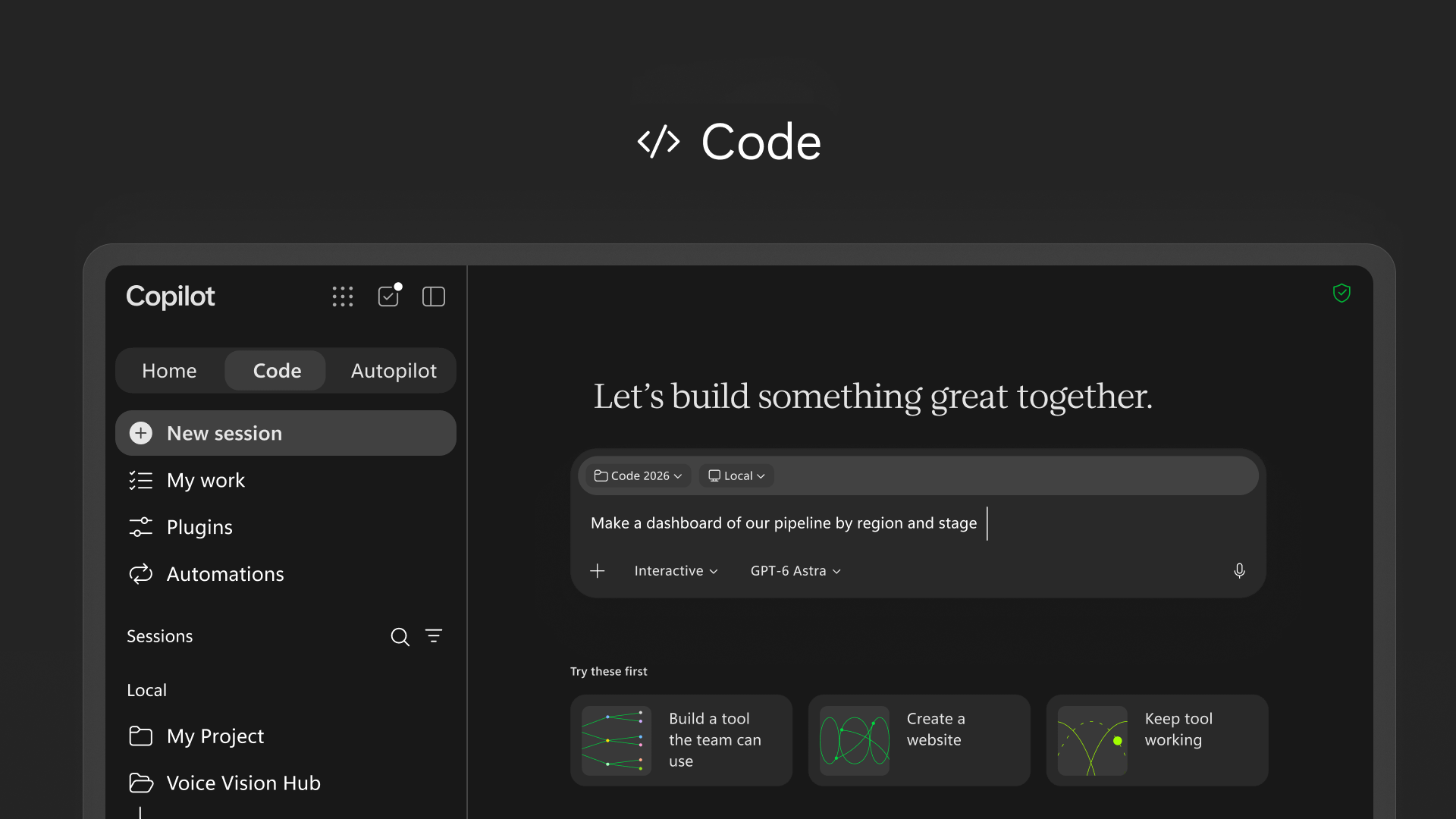
And no, this doesn’t mean we won’t need software developers anymore. Pro-code stays in GitHub Copilot, the go-to tool for developers, and they get more connectivity into the Copilot platform.
By the way: Code rolls out in Frontier at the end of the month, with broad availability in the coming weeks.
Managed Runtime: where your apps will live
So how do you share the apps you’ve built with Code? That’s where Copilot Managed Runtime comes in. It’s managed and governed by your IT, but it allows everyone in your company to share an app with teammates, connect it to live data and access it from anywhere.
Managed Runtime is the same foundation that runs apps built in Cowork, Code and Copilot Studio, and it’s open for third-party and pro-code developers, too. It’s now in public preview and will also be accessible inside Code.
You’ll get your digital teammate
You may have already heard about “Scout”. Scout is now called “Autopilot” and is the third new capability in your Copilot app. The great part: it works for you, and you can customize it as you need. Give it a name, a role and a goal, and it goes to work, even when you’re not working. It doesn’t wait for a prompt from you. It works proactively.
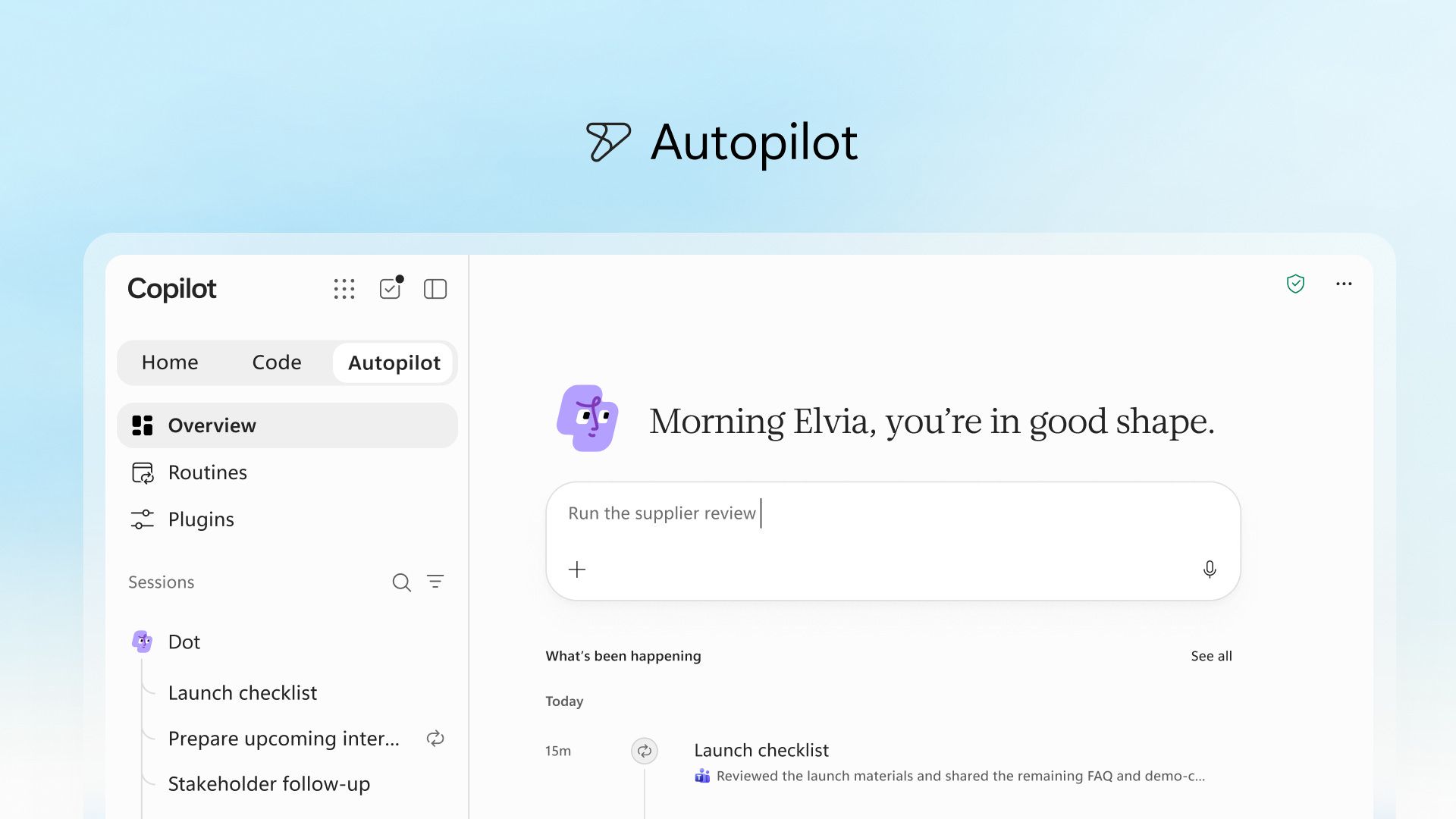
It can do things like set up and manage a full supplier review process:
Building the schedule and workback plan
Handling the prep
Running meetings and follow-ups on its own
Reaching out to stakeholders for updates
Sounds fancy, but also a bit scary, doesn’t it?
It’s cloud-hosted, so no constant monitoring is needed. Of course it lives in your tenant, with its own identity, memory, computer and workspace. And now the power of Microsoft’s approach compared to other providers: it’s built on Microsoft IQ, which means it understands how your organization actually works.
You “@mention” it in Teams or Outlook like a colleague, with permissions, audit and governance behind it. Autopilot goes to private preview at the end of the month.
But who pays for all of this?
In almost every conversation I have with business decision makers right now, one question comes up.
“How do we prove that Copilot is worth the money?”
Most organizations can show activation or usage, only very few can show behavior change or business impact, read more in a previous episode.

As long as Copilot was mainly a license per seat, you could live with that gap. With last Friday’s Evolution of the Copilot pricing model, that changes.
Copilot now has two layers.
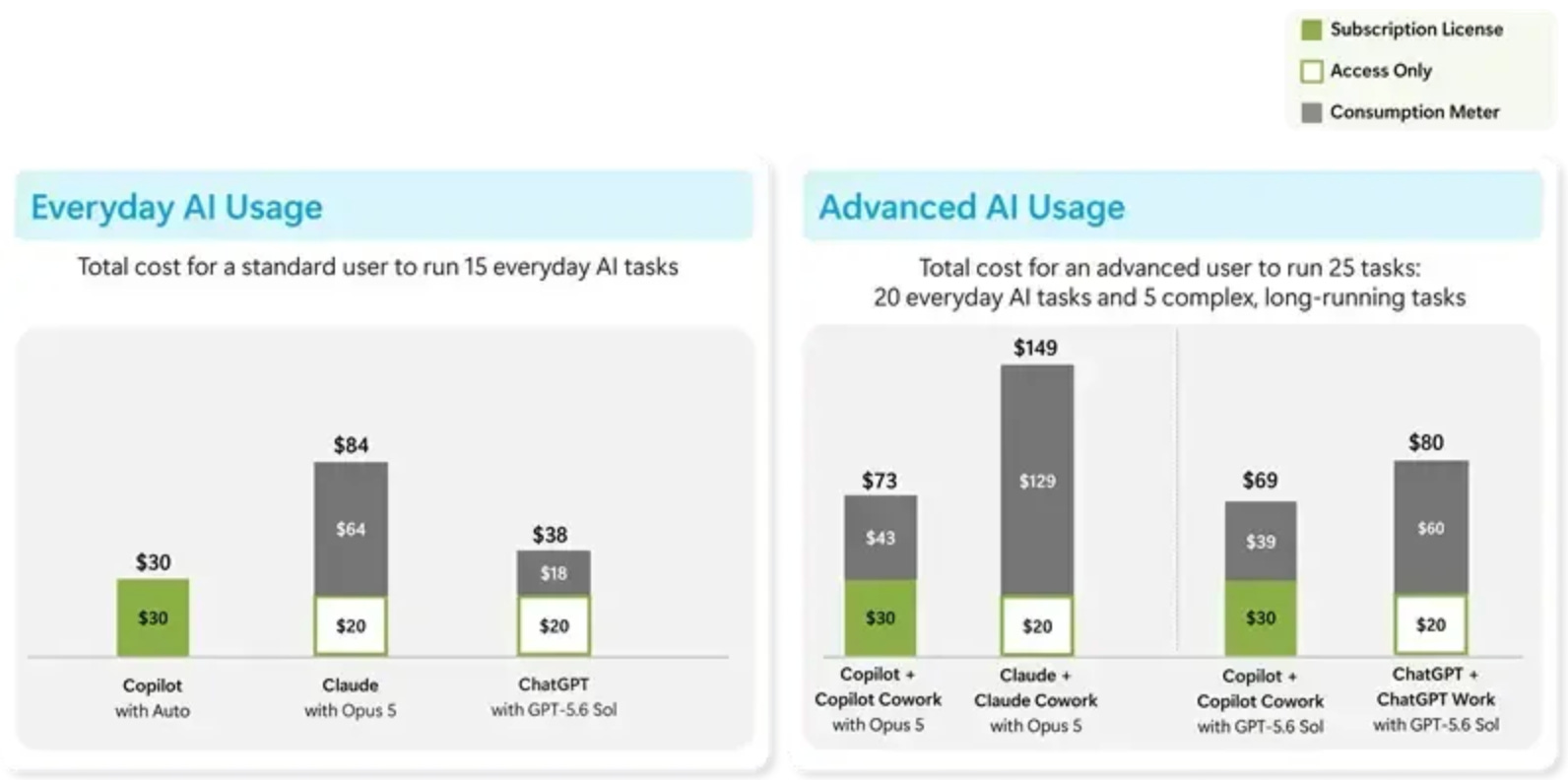
The user subscription license (USL) is for everyday AI. Copilot in Chat and in Word, Excel, PowerPoint, Outlook and Teams, plus model selection and Auto, which picks a model per request based on accuracy, speed and cost.
Usage-based billing (UBB) is for work you hand off. Cowork, Code, Autopilot, frontier models like Fable and Astra, and new advanced features in apps like SharePoint. UBB sits on top of the USL. Without the license, you can't use these capabilities. And the apps from the section above? Building and running them follows usage-based billing too.
Two details I’d point out to every CIO.
First, the license gets usage limits. Microsoft says the vast majority of people will never hit them. The heaviest users get a warning, then a choice: switch to Auto at no extra cost, or move to credits. Now think about who your heaviest users are. Usually your champions. The people your rollout depends on will be the first to see that warning.
Second, the meter itself has been around since June. Cowork runs on credits since its GA (I wrote about the traps in my licensing guide). What changed on Friday: Microsoft made the split the official model for the whole product. And once Copilot routes your request to Chat, Cowork or Code by itself, I’m curious how clearly Microsoft will show the moment a request moves from flat to metered. In SharePoint, users confirm before credits are used. That’s how it should work everywhere.
Microsoft compares the model to a plug-in hybrid. You know me, I’ll stay with the gym. 😁
The license is your membership. It gets you in the door and on the machines, and you pay for it whether you show up or not. Cowork, Code and Autopilot are the personal trainer. Billed per session, and only for members. And the trainer is where the bigger results come from, because that’s where work actually gets done for you.
Copilot cost used to be a headcount question. Now it’s a work question.
I think the model is fair. For the agentic part, you pay per task instead of buying capacity for people who never use it. But with a meter running, every agentic task has a price, and at some point your CFO asks what came back for it.
And an agent that works while you sleep also burns credits while you sleep.
FinOps for AI puts the meter into the product
For me, FinOps for AI is the most important announcement of the week. The least exciting title, the biggest effect on your rollout. It’s also the most common request I receive from customers with a Frontier mindset. They have already started thinking about how to implement proper FinOps for AI.
Visible, but switched off (mostly)
Microsoft wants everyone to see what Copilot can do, so Cowork, Code and Autopilot show up in the product for your users (admins can hide them with a discovery setting). For enterprise customers they stay off until an admin creates a spending policy in the Microsoft 365 admin center, and nothing is billed before that. Budgets work at tenant, group and user level.
From a governance view, that’s exactly right. From an adoption view, I’m worried. Your users will see the trainer through the glass and can’t book a session. And I can already picture the organizations that leave the switch off because nobody wants to own the budget or decide. Their people stay in the assist layer, exactly where they feel more productive but can’t prove it.
But for smaller companies, the default is about to flip. From November 2, new Microsoft 365 Copilot Business licenses bought through a CSP partner come with usage-based billing switched on (Partner Center announcement). Pay-as-you-go is the default, the Azure subscription is already set up, there’s a preset monthly limit, and Cowork is part of it.
I get why Microsoft does this. Less setup, faster adoption. But my first question was: how does the billing work if nobody ever set up a payment method? Part of the answer: the Azure subscription needed for usage-based billing comes with the license. So if you buy Copilot Business after November 2, ask your partner two things: what’s our monthly limit, and where do we see the credits on our invoice?
Important: This is only for smaller businesses (up to 300 employees) no changes for Corporate or Enterprise customers!
Check the policies you already have
This one is easy to miss. Every spending policy has a setting called “Auto-apply new services”, and it’s on by default (Microsoft Learn). New Copilot services and agents land in your policy automatically. So if you set up a Cowork policy in June, the new SharePoint features (and maybe more) could run on that budget without anyone deciding it. If you want to review new services first, switch the setting off.
Value, measured in hours
The consumption dashboard in Viva Insights now shows Cowork “assisted hours and value”: your top Cowork tasks, sorted into eight types of work, with estimated hours returned next to the credits used. The estimates are based on productivity research and kept conservative on purpose (Measuring the value of Cowork).
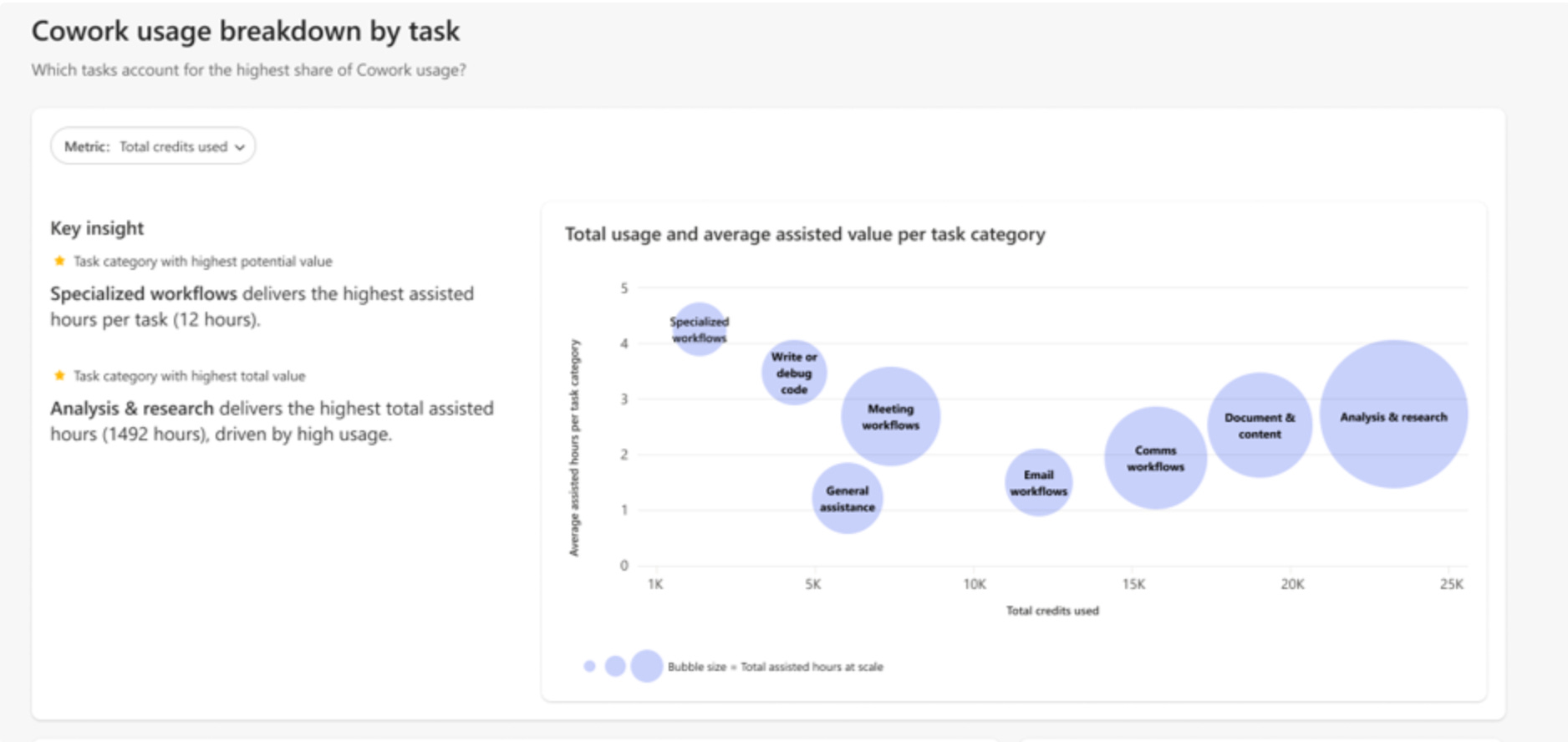
I like that Microsoft moves from counting prompts to looking at tasks, and that they call the metric what it is: a proxy. But it’s still hours. You know my view from Episode 112: hours returned are capacity.

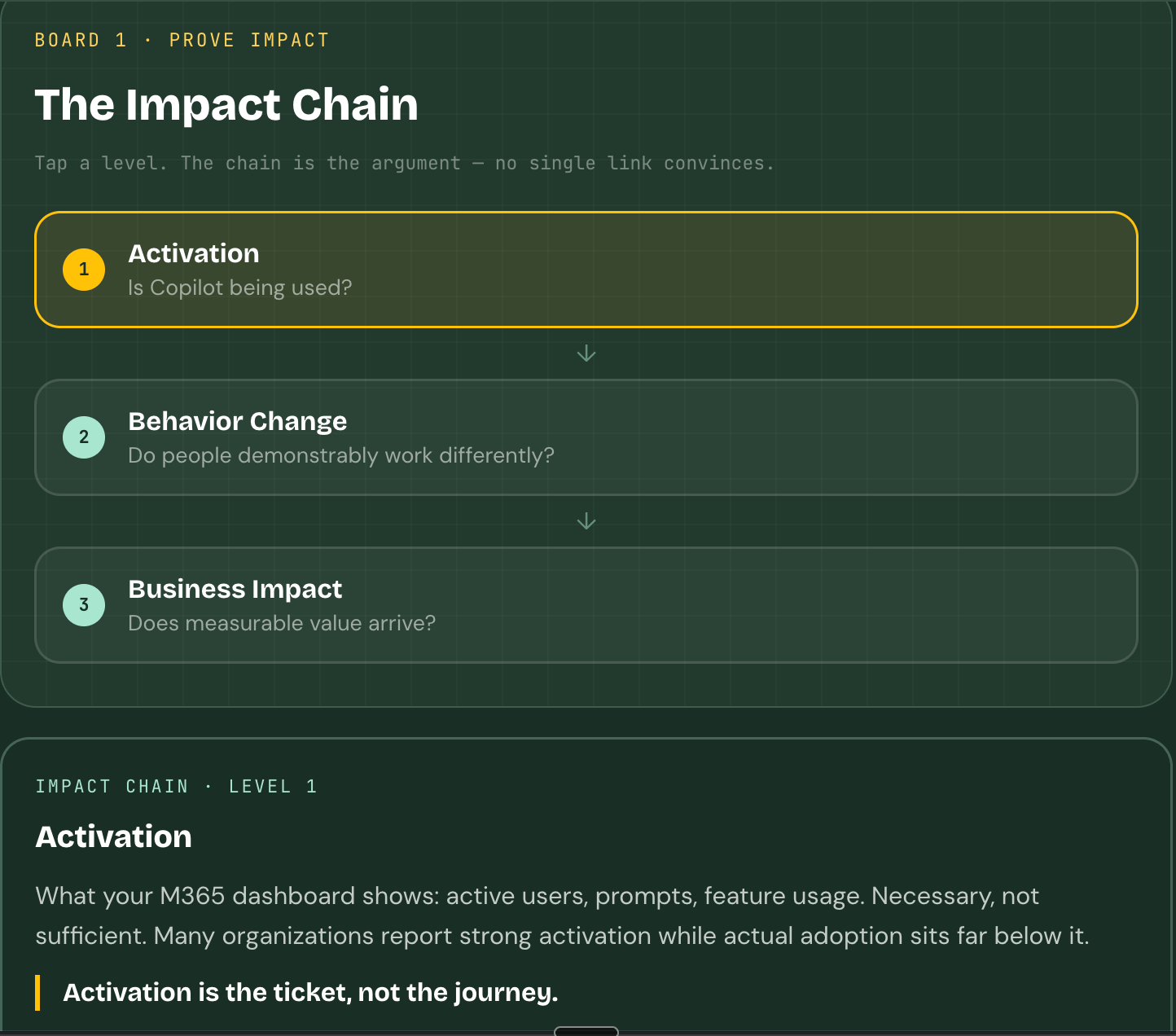
They only turn into value when someone decides what to do with them. That step is still yours, and it’s what the Impact Chain in my Copilot ROI Guide is for.
Your content decides what a credit is worth
Copilot in SharePoint and OneDrive go GA starting September 30. Everyday features stay in the Microsoft 365 Copilot license. Large-scale work and advanced features like image generation, AI site analytics reports and near real-time metadata autofill use credits.
And the SharePoint post has the number. In Microsoft’s evaluations across six industries, Copilot’s accuracy went up by an average of 17 percentage points on content that Copilot in SharePoint had enriched and structured. Microsoft’s own legal team took a contract review with a 72-hour outside counsel SLA down to about 10 minutes of automated analysis, plus up to one hour of validation by lawyers.
With usage-based billing, messy content costs you twice. You get worse answers. And every time someone reruns an agentic task on messy content, the meter runs again.
So the cheapest AI investment this autumn:
clean up the three SharePoint libraries your most important processes run on. The next agent can wait.
What I would do in the next 30 days
Check your existing spending policies before September 30. “Auto-apply new services” is on by default, switch it off if you want to review new services first.
Decide on UBB per group. Start with one or two teams that have a clear use case, a cap and alerts.
Plan for your champions hitting the limit. Decide in advance whether they switch to Auto, get credits or go through your approval flow.
Give each important agentic use case one business metric, like cost per proposal. Put it next to assisted hours and look at both every month.
Clean up the content behind those use cases. You pay once, and every future run profits.
Decide who owns (and pays for) the apps your business builds with Code, before Code lands.
The next Copilot era will be great
I believed that from day one, and after Friday I believe it even more. That’s also why I started with Copilot Your Day few years ago.
But the question from every meeting doesn’t go away:
“How do we prove that Copilot is worth the money?”
With a flat fee, you could park it until the next renewal. That’s over. The license is the membership, the credits pay the trainer. Nobody ever got fit by paying for a membership. And the best trainer can’t help you if you don’t know what you’re training for.
So before you flip the switch, write down the goal. Then turn on the meter.
And as Microsoft already teased, there will be even more things that come:
FAQ
What is the new Microsoft Copilot app with Home, Code and Autopilot?
Microsoft announced the new Copilot app on September 25, 2026. Home brings Chat, Cowork and Office in Copilot into one starting point, Code lets people build apps by describing them, and Autopilot (formerly Scout) is an agent that keeps working without a prompt. Home and Code roll out through the Frontier program, and Autopilot goes to private preview at the end of September 2026.
What is the difference between the Copilot user subscription license and usage-based billing?
The user subscription license (USL) is a per-user license for everyday AI: Copilot in Chat and in Word, Excel, PowerPoint, Outlook and Teams, including model selection and Auto. Usage-based billing (UBB) covers agentic work such as Cowork, Code, Autopilot and frontier models, paid with Copilot Credits. UBB requires the USL. For enterprise customers, it stays off until an admin creates a spending policy in the Microsoft 365 admin center.
Will my Copilot power users hit a usage limit?
Microsoft is setting usage limits on the user subscription license and says the vast majority of people will never reach them. The heaviest users get a warning first and can then switch to Auto at no extra cost or move to credits. Decide in advance which option your champions get.
Is Copilot usage-based billing turned on by default?
For enterprise customers, no: usage-based billing stays off until an admin creates a spending policy in the Microsoft 365 admin center. For new Microsoft 365 Copilot Business licenses bought through a CSP partner from November 2, 2026, it’s on by default, with pay-as-you-go billing, a preset monthly limit and the Azure subscription already set up. And once a spending policy exists, its “Auto-apply new services” setting is on by default, so new Copilot services are added automatically.
How does Microsoft measure the value of Copilot Cowork?
The consumption dashboard in Insights shows Cowork “assisted hours and value”: your top tasks in eight types of work, with estimated hours returned next to the credits used. Microsoft calls the metric a conservative proxy that should sit next to your own business outcome measurement.
Is Copilot in SharePoint generally available?
Yes. Copilot in SharePoint and Copilot in OneDrive roll out as generally available to worldwide tenants starting September 30, 2026. Everyday features stay in the Microsoft 365 Copilot license, while large-scale work and advanced features like image generation, AI site analytics reports and near real-time metadata autofill use Copilot Credits. In Microsoft’s evaluations, accuracy improved by an average of 17 percentage points on content enriched by Copilot in SharePoint.
Take it with you
The Impact Chain tactic board: tap through activation, behavior change and business impact, and take it into your next steering meeting. copilotyourday.com/boards
If this episode was helpful for you, please like, comment, and share it. With that you are supporting me. Thank you, I highly appreciate it!
See you next week! Your Copilot Your Day Captain