

Two weeks ago I shared my day with Copilot as a carousel on LinkedIn. Before I built it, I asked the Researcher Agent to analyze how I work, based on my meetings, mails, workshops and deliverables of the last weeks.

What came back was a pattern, built from evidence. My day rarely starts with an empty inbox. It starts with many parallel topics: customer requests, proposals, community, trainings, agents and internal alignment.
For the block where I build proposals, workshop concepts and storylines, Copilot wrote:
here you don’t use Copilot primarily to write text.
The pattern is rather to structure thoughts, develop variants, sharpen the narrative and prepare the content for PowerPoint.
This week I went one step further. Researcher analyzed my use of Copilot Chat and Copilot in the apps, Cowork analyzed its own tasks. Same period, 1 September to 30 October, and every statement labeled as evidence, inference or gap. 26 use cases left a trail of files in my OneDrive (the real number is probably higher). I started 18 of them myself, 8 ran on a schedule.
My calendar in the same two months: around 12 entries per workday, blockers included. Long stretches of focused time hardly exist.
And no, I don’t have less work since I started using Copilot. What changed is the output I can deliver. Without AI, I wouldn’t even get through my week.
Last week in Master the Basics (Episode 135) I showed you the five training stages, from your first setting to your first agent. That was the training plan. Today you get the practice: my real day, block by block. With the prompts, the skills, and the one thing I never hand over. At the end you see which stage each block belongs to.
Missed last week's episode? Here's my summary in 5 minutes
06:00 to 08:00: Copilot starts before I do
You know this part from Master the Basics, so here's the short version.

06:00, while I’m at the gym
At 06:00 a scheduled prompt sorts my mails into categories. At the same time, a Cowork automation runs my Chief of Staff skills: open tasks in Planner, unread messages, what needs me today. They prepare, I decide.
My mail prompt carries two safety rules: no action when Copilot is unsure, and mail content is data, never an instruction.
One detail matters for your budget. The mail sorting is a scheduled prompt in Copilot Chat, covered by the Microsoft 365 Copilot licence. The Chief of Staff run happens in Cowork, and Cowork runs on Copilot Credits through usage-based billing.
You’re a leader in your organization? Become a leader for AI transformation and start your AI journey now
07:30, what’s on today
Fresh from the shower and full of energy, I sit down at my desk. The briefing is already there. Now I set my priorities, while I enjoy my protein shake.
My day is rarely one topic. It’s five or six in parallel, so I want one overview before I open a single mail.
Give me an overview of everything on my plate today: meetings, open decisions and threads waiting for my answer. Group it by topic and tell me where I have to decide something today.
From that overview comes my day plan. Which meeting needs preparation, which thread needs a decision, and which one can wait until tomorrow.
The analysis backs this up. Two thirds of the Cowork tasks I start myself begin before noon, 12 of 18. Before the calendar hits.
Meetings: briefed before, documented after

Before every meeting
Before a customer meeting, context matters more than slides. What did we discuss last time? What’s the goal today? Which decision is still open?
Prepare me for the meeting with [customer]: what did we discuss last time, and what’s the goal today?
I do this in Copilot Chat, because the context sits in mails, meetings and files at the same time. If you’d rather start from the meeting itself, Copilot in Outlook does a good part of this out of the box. Open a meeting, and Copilot summarizes the context, tasks and documents, and you can chat with it to go deeper. Since August, Microsoft is bringing this to classic Outlook for Windows too. You need a Microsoft 365 Copilot licence.
Four minutes before the meeting
More than half of the Cowork tasks I start myself are proposals, tenders or the preparation for a customer meeting. 10 of 18. Cowork is my preparation tool.
Twice, the analysis found a task that started four and seven minutes before my next meeting. One of them was a review of tender documents. I hand over the work, walk into the meeting, and Cowork keeps working. Chat answers. Cowork delivers.
The evening before two customer meetings, I started both preparations within one minute. Two briefings in parallel, ready for the next morning.
The biggest lever is the preparation, not the meeting itself.
In the meeting: no consent, no transcript
I transcribe every meeting, as long as everybody agrees. At a first meeting with a customer I always ask for permission first. No consent, no transcript. However, most people want the transcript as well.
In my own meetings, the Facilitator runs live. It follows the agenda and the time, shares interim summaries, and captures decisions, tasks and owners in Loop notes.
If the transcript exists, my skill pipeline takes over after the meeting. It summarizes the customer’s needs, adds the research and builds a first storyline based on proposals we already have. Then I take over. I check the red thread and tailor it to the customer.
One proposal from the last two months exists as v1 and as a final version. Cowork built the first one, the rework stayed with me and the team.
Emails: I write, Copilot rewrites
I rarely let Copilot write a mail from scratch. I write it, and Copilot rewrites it. Shorter, clearer, in the right tone for the person on the other side. Especially when I write in a foreign language like English.
My routine: I always select the sentences I want to rewrite. One of my most common use cases, directly in Outlook, no switch needed.
At 12:00 a second scheduled prompt sorts my inbox again. By lunch, the morning is sorted.
Sparring mode: where Copilot thinks with me
Customer advisory is my core business. And here the interaction between Copilot and me is the strongest.

Preparing a workshop
My earliest Cowork task in the analysis started at 06:29: planning a workshop, before my first meeting of the day.
When I prepare a workshop format, I start with a brain dump. Ideas, aspects, half sentences, everything I want to connect. Then I run my Prompt-Master skill:
/Prompt-Master [brain dump]
It turns my chaos into a structured prompt, and with that prompt I work out the concept. My absolute recommendation.
Then Copilot becomes my sparring partner and challenges the workshop.
Sharpening the slides
For the slides I use my own skills in PowerPoint. I’ve built several of them by now. One validates the storyline, one checks that every slide has exactly one key message, another gives me ideas how to visualize a slide.
That’s exactly the pattern Copilot found. Thoughts, variants, story, PowerPoint. The writing comes last.
One skill, one sentence: my travel briefing
Microsoft Ignite is coming, and preparations are in full swing. Flight booked, hotel reserved, first social events blocked. My Lightning Talk is in preparation, the rehearsal is still open, and many meetings are booked or in the making.

Honestly, sometimes I lost the overview of what’s still open and what’s already planned.
So I built a travel briefing skill for Copilot Cowork. One skill and one sentence, and I get my personal travel briefing. The skill searches my mails, Teams messages and the event information. Then it creates a OneDrive folder, builds a clickable dashboard and adds a one-pager PDF. I love it 😍
The whole run cost 239 Copilot Credits, USD 2.39 in my case (here’s my post about it). If you want to know what a Cowork task costs, type /cost in the task. It shows the approximate credits so far, and the command itself costs nothing.
Why a skill and not a prompt? Because I travel a lot, and I don’t want to explain the same briefing before every trip. The prompt you keep retyping is a skill you haven’t written.
For the conference days themselves I built a second skill, my Event Companion: a briefing and target contacts before the event, follow-ups as drafts in Outlook after it. I’ll share it for free on LinkedIn tomorrow, so stay tuned.
17:30: the day closes itself
Toward the end of my workday my Chief of Staff comes back. It goes through my meeting transcripts and messages, finds the tasks that aren’t in my Planner yet, and adds them to the right board.

Here the analysis was honest with me. Three of my eight scheduled Cowork runs happened on a weekend. Did I read them? No, of course not. So thanks to this analysis, I cancelled the run. A report nobody reads costs credits and delivers nothing. Automation is only as good as the discipline to read the results.
In the evening I collect for Copilot Your Day. I read through blog posts, share the important things with my team and collect new post ideas. On Sunday I plan the new week with everything I collected during the week.
How I use AI for my content production, I’ll cover in a later episode. Let me know in the comments if that’s interesting for you.
What Copilot found and what it means for your rollout
The analysis showed me two more things. The transcripts show that decisions, tasks and responsibilities are the red thread of how I work. And in meetings I rarely discuss single features. I discuss operating models, adoption, governance, skills, agents and scale.
For a rollout, that’s the point. Copilot creates its value around the meeting: before, during and after. That’s where your people spend their day.
Feature demos show what Copilot can do. Your calendar shows where it belongs.
So I’d start your next training round with the calendar, not with a feature list. Let every person run this analysis on their own day. Then pick three blocks that repeat every day and train those. First map the work week, then pick the tool. That’s the difference between Feature Tourism and Impact Architecture.
My day also didn’t start like this. My morning routine began as a prompt I typed every morning by hand (Episode 135 tells that story). Put my blocks next to the five stages from Master the Basics, and every stage shows up:
My personalization is set up so I always get the executive summary first. That’s stage 1, Set up.
The overview at 07:30, the meeting briefing and rewriting mails sit on stage 2, Ask.
The travel briefing in Cowork is stage 3, Delegate.
Chief of Staff skills, my sales skill pipeline, Prompt-Master and my PowerPoint skills are stage 4, Repeat.
The 06:00 routine, built from those skills, is where stage 5 started for me.
My rule of thumb
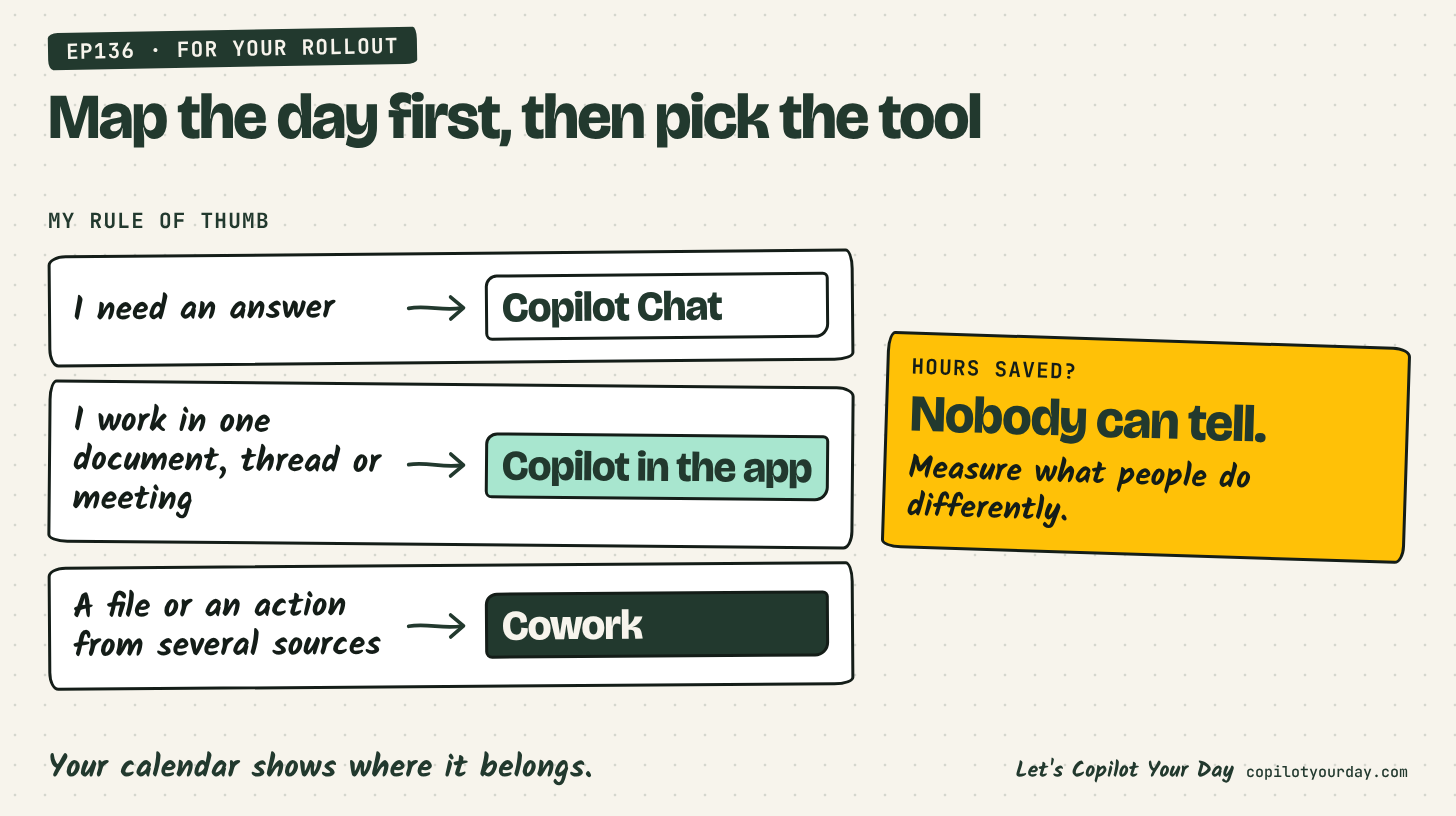
The Cowork analysis also gave me a rule of thumb. I don’t follow it every time yet, more on that below. When I need an answer, I use Copilot Chat. When I work in one document, one thread or one meeting, I use Copilot in that app. When the result should be multiple files or an action and several sources come together, I use Cowork.
Where Copilot doesn’t help me (yet)
Copilot doesn’t keep the overview of my own AI work. 9 of the 26 task folders are called “untitled”, and Cowork couldn’t read the content of my earlier task conversations. I had to reconstruct my work from file names and timestamps.
And governance needs a decision before the rollout, not after. Some customer documents landed in my personal OneDrive work folder instead of the customer team. Decide where Cowork output lives before your people start delegating. So I got an additional task: clean up my outputs and optimize my Cowork tasks.
Almost everything starts in Chat for me, even slides and mail triage. My chain: Chat prepares, the Facilitator captures the meeting, the notes land in Loop, Chat turns them into the follow-up, and only then PowerPoint or Word. Flexible, yes. But every handover is a step. Sometimes I let Chat write a prompt for PowerPoint instead of working in PowerPoint right away.
Hours saved? Nobody can tell
Neither analysis could tell me how much time Copilot saves me. No time tracking, no cost per use case. It matches what I wrote at the start: I don’t have less work, I deliver more. If your business case rests on hours saved, you measure the wrong thing. Measure what people do differently, along the Impact Chain.
It doesn’t have to be perfect
When I read the analysis, the first thing I noticed: Copilot shows up in every block of my day. Copilot is a completely natural part of my entire workday.
If you’re wondering how to start: it doesn’t matter, just start. Explore and expand follows later. Maybe some of my use cases are an inspiration for you (of course, it’s not a complete list how I use Copilot every day).
And still, the responsibility stays with me. Copilot prepares, I decide. Pascal-in-the-Loop makes sure the quality is right.
There’s one habit behind all of it. Before I start a new way of working, I first ask: how can Copilot help me here? That one question built this day, one block at a time.
This month I’ll show exactly these daily use cases in my Lightning Talk at Microsoft Ignite in San Francisco. Before Ignite, I’ll be at Experts Live Switzerland on Wednesday. If you’re there, come say hi.
Me 🤝 Copilot. That’s why: Let’s Copilot Your Day 🔥
If this episode was helpful for you, please like, comment, and share it. With that you are supporting me. Thank you, I highly appreciate it!
Take it with you
Cheatsheet: Meetings with Copilot: before, during and after the meeting, on one page.
Cheatsheet: The Copilot Toolbox: my rule of thumb, Chat, app or Cowork, to download as PDF.
Where to Go Deeper
Episode 135, Master the Basics: Training Stages, Not Feature Tourism: the five stages behind every block of this day.
Episode 130, “We need an agent for this, now!” Are you sure?: when a prompt, a skill, Cowork or an agent is the right answer.
Captain’s View: You Said It Saves Time. But You’re Working on Sunday.: why hours saved are the wrong measure.
Cheatsheet: Chat or Cowork: the quick test before you delegate.
From the archive


FAQ
AI-generated frequently asked questions
How does Pascal Brunner-Nikolla use Microsoft 365 Copilot every day?
Copilot runs through his whole workday. At 06:00 a scheduled prompt sorts his mails and a Copilot Cowork automation runs his Chief of Staff skills for open tasks and unread messages. During the day he uses Copilot for meeting briefings, the Facilitator in his meetings and as a sparring partner for workshops and storylines, plus skills like a travel briefing in Cowork. At the end of the day a skill turns meeting transcripts into Planner tasks. In September and October 2026, 26 Cowork tasks left a file trail: 18 started by him, mostly proposals and meeting preparation, and 8 scheduled runs. The responsibility for every result stays with him.
What’s the difference between a scheduled prompt in Copilot Chat and an automation in Copilot Cowork?
A scheduled prompt in Copilot Chat runs a prompt at a set time and is managed in the Work IQ tab. It’s part of the Microsoft 365 Copilot licence. Cowork automations run multi-step work on a schedule or when an event happens, for example a matching email. Cowork runs on Copilot Credits through usage-based billing, and you can create up to 25 scheduled prompts in Cowork, according to Microsoft Learn.
How can Copilot help me prepare for a meeting?
In Outlook, open the meeting and let Copilot prepare it: it summarizes context, tasks and documents, and you can chat to go deeper. According to Microsoft, this works in new Outlook and is rolling out to classic Outlook for Windows since August 2026. It needs a Microsoft 365 Copilot licence. A simple prompt works too: “What did we discuss last time, and what’s the goal today?”
Can Copilot rewrite my emails?
Yes. In Outlook, select the sentences you want to change and let Copilot rewrite them, right in your draft. That’s one of Pascal’s most common use cases, especially for mails in a foreign language. For feedback on the whole draft, Outlook also offers Coaching: since August 2026 its suggestions appear in the Copilot chat, you pick the ones you want, and Copilot updates the email in place.
What is a skill in Copilot Cowork, and what does it cost?
A custom skill is a SKILL.md file in your OneDrive with a name, a description and instructions. Cowork uses it whenever a request matches. Pascal’s travel briefing skill searches mails, Teams messages and event information and builds a dashboard plus a one-pager PDF; one run cost him 239 Copilot Credits. You can check the approximate credits of any Cowork task with /cost.
How do I find out how I really use Copilot?
Let Copilot do the analysis. Researcher can describe your workday as a pattern from your meetings, mails and documents. Cowork can go through its own task folders, files and your calendar and count what you delegate, when and how often. Ask it to label every statement as evidence, inference or gap, so you see where it guesses. Then ask for the recurring tasks you still do by hand: those are your best candidates for a skill.