

Last week at Microsoft Ignite in San Francisco, cost showed up in almost every segment of the keynote and sessions.
Judson showed his Sunday preparation for a keynote in February, Chevron showed a Copilot Cowork use case that produced an engineering document, and Mustafa showcased the new MAI models, which do tasks at a fraction of the cost. So the bottom line was clear:
We’re shifting from everyday AI to Process AI cases.
To do so, we will produce additional AI costs, so it’s crucial to have a “good” AI-spending to AI-value ratio.
Now put one number next to that: 4,000. That is the default monthly limit per user that Microsoft applies to new Microsoft 365 Copilot Business purchases. One good Tuesday, and the month is over.
Microsoft gave the answer a name on stage: FinOps for AI. I have been writing about it for months. Here is why it is fundamental, how you build it, and what the tools can do today.
In case you’ve missed all the announcements, here’s my podcast “in 5 minutes” focused on Ignite updates.
Why FinOps for AI is fundamental
For twenty years, SaaS had a simple deal: pay once per user and month, use as much as you want. That made it easy to calculate your total cost per workplace. For the work that matters most, that deal is over.
Microsoft (like all other AI companies) now runs two bills. Everyday AI (chat, Copilot in the apps) stays in the license. Advanced work runs on Copilot Credits: Cowork, Copilot Code, Autopilot, the Work IQ APIs, agents in Copilot Studio. What a task costs depends on the model, the context it retrieves, the runtime and the tools it calls. Nobody can tell you up front what “one task” costs.
That has consequences.
Your most engaged people will burn, or let’s say “invest”, the budget first. The colleague who delegates work to Cowork every day is exactly who you want. She is also the one who hits the limit on the 14th, or maybe even on the 2nd of the month.
The limit is a hard stop, because when a user reaches it, access to those services is gone until credits reset on the first of the month, unless someone approves more. Autopilot, according to Microsoft’s documentation, doesn’t even show an explanation. It stops running automations, and the user is left guessing. (I would prefer that Microsoft at least gave us a hint. Since it’s still Frontier I’m quite sure this will come)
At the same time a limit or amount of Copilot Credits says nothing about value. Usage statistics counted gym visits. Credits count the weight on the bar. Neither tells you whether anyone is getting stronger.
We have been here before. Cloud moved from fixed servers to variable consumption, and FinOps emerged because central IT could not steer a bill that other people cause. AI is the same movie at higher speed. This time the consumers are every knowledge worker in the company.
How to build your FinOps for AI journey
FinOps for AI is an operating model first. The dashboard makes it visible but comes second. Here are five building blocks to start the FinOps for AI journey.
1. Put the cost where the value is decided.
Think of AI cost like travelling. You may have a travel office that books the flight for you with the company’s credit card, but your manager approves it.
So travel budgets sit with team and department leads, because that is where someone decides whether the trip is worth it. AI needs the same logic. Standard tasks run on the license. Compute-heavy workflows and agents draw credits from the business unit’s budget. Whoever needs more capacity makes the case in their own business case.
As long as IT pays for every usage-based AI bill, nobody in the business asks about ROI, and you can’t scale it either.
2. Design policies by cohort.
One default policy for everyone, then separate groups for the people who really delegate: pilots, makers, power users. Policies don’t add up.
If a user sits in several policies for the same service, the one with the highest per-user limit applies in full. Know that before you build twelve of them.
3. Measure a baseline before you commit.
Start pay-as-you-go, watch the pattern for eight to twelve weeks, then decide on a pre-purchase plan.
Committing to credits before you know your pattern is like signing a ten-year gym contract in January.
4. Turn “I need more” into a process.
People will hit limits, and they can request more credits from where they work. Decide who approves, in which tool, and how fast.
A request that waits two weeks kills the habit you just built.
5. Put value next to cost, every month.
One meeting with IT, Finance and the business owner. Cost per cohort, the forecast, and what the work delivered. For the value side I use the Impact Chain: Activation, Behavior Change, Business Impact.
Cohorts that only burn credits get a lower limit and a conversation. Cohorts that deliver get more.
What the technology can do today
I was super happy to see all the announcements around FinOps for AI during Ignite and therefore Agent 365 will play an important role in this game. Let’s put it in three layers.
Layer 1 is control
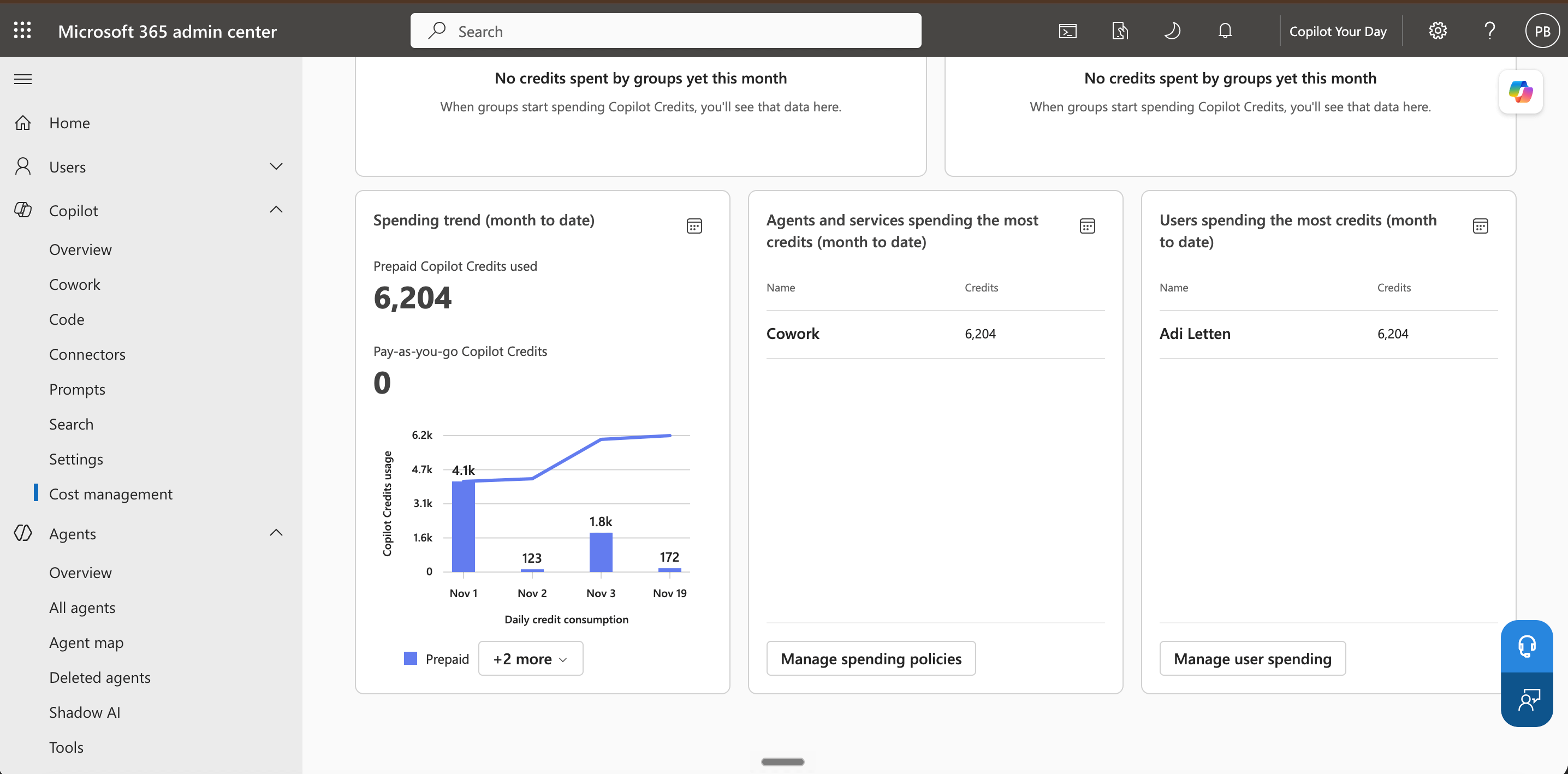
Cost Management in the Microsoft 365 admin center.
Spending policies per user group or per resource, monthly limits per policy and per user, alerts to admins and to the users themselves. The underrated part is the billing method per policy. You can bill a policy to a different Azure subscription, and that is how departmental billing becomes real. For Cowork you can attach a model template and define which models a group may use. One setting to check today: “Auto-apply new services” is on by default, so every newly metered service lands in your existing policies automatically. There is also a Graph API in beta for policies and balances. It speaks credits only, no currency.
Layer 2 is insight
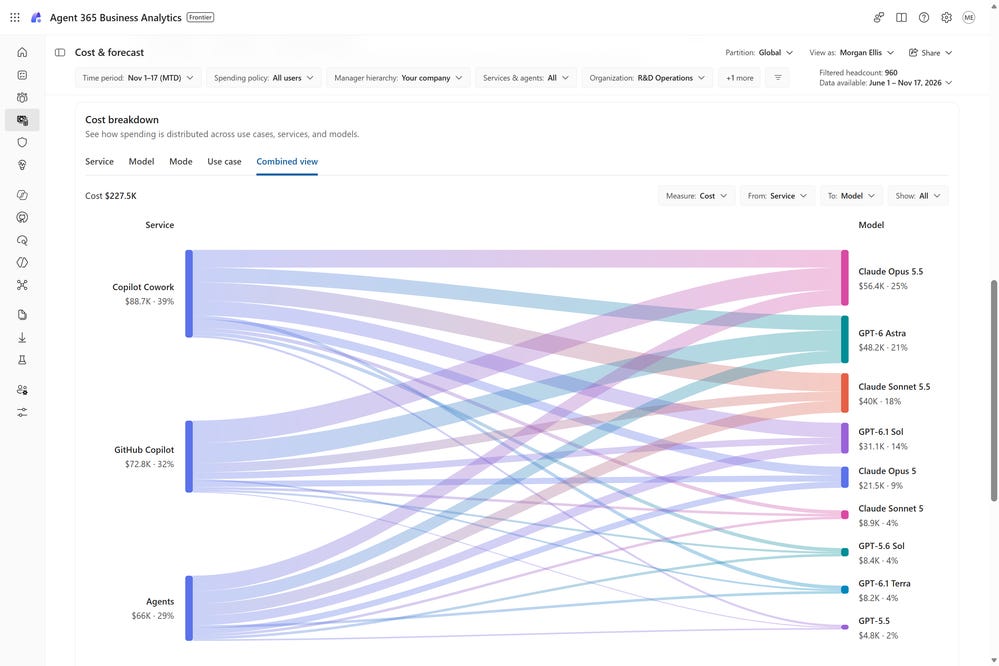
Agent 365 Business Analytics. Announced at Ignite, available in Frontier, and built for business leaders instead of admins. What I like about it:
Cost & forecast shows the cost drivers by service, model, job function and organisation. You get a base forecast, a growth forecast and what-if scenarios for a spend cap or a different model mix, without changing anything live.
Budget targets come with a runway: the days left until a group reaches its limit. Users are flagged once they pass 85 percent.
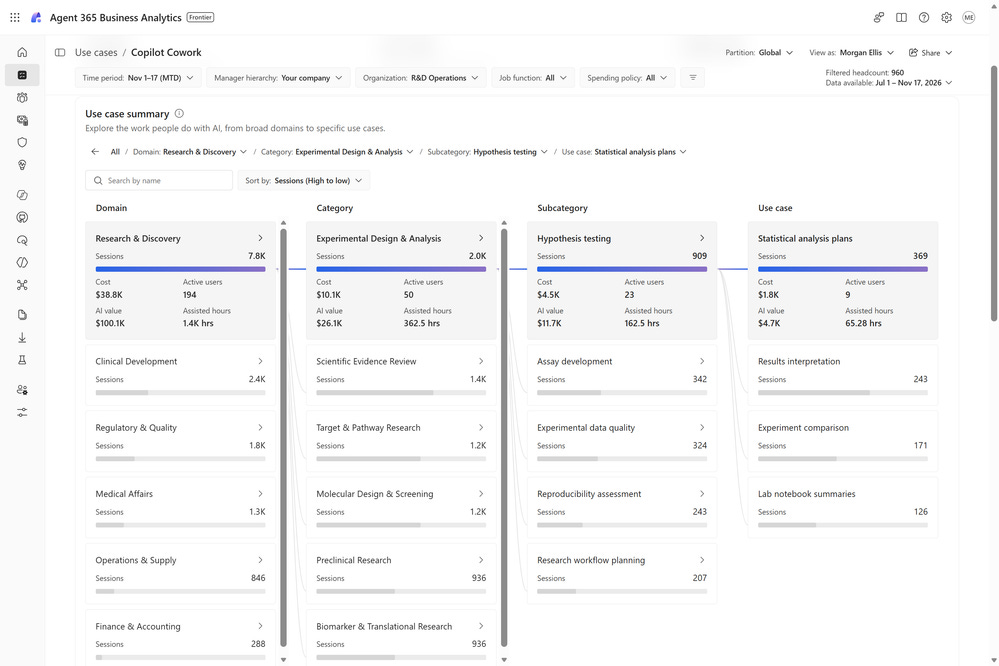
Use cases shows what people do with Cowork and agents, how often the work was completed, and the “assisted hours” behind it.
Access follows the hierarchy. The top three management layers see the whole tenant. Managers of teams of ten or more see their own organisation.
A budget target in the app is a reporting line and limits nothing. Only a spending policy stops spend. And assisted hours estimate the time a person would have needed for the work. Microsoft says it clearly in the documentation: they are not hours saved, and AI value is not realised savings. Use it as a signal for where to look. The proof still comes from your own business metrics.
Layer 3 is the products
each one has its own meter logic.
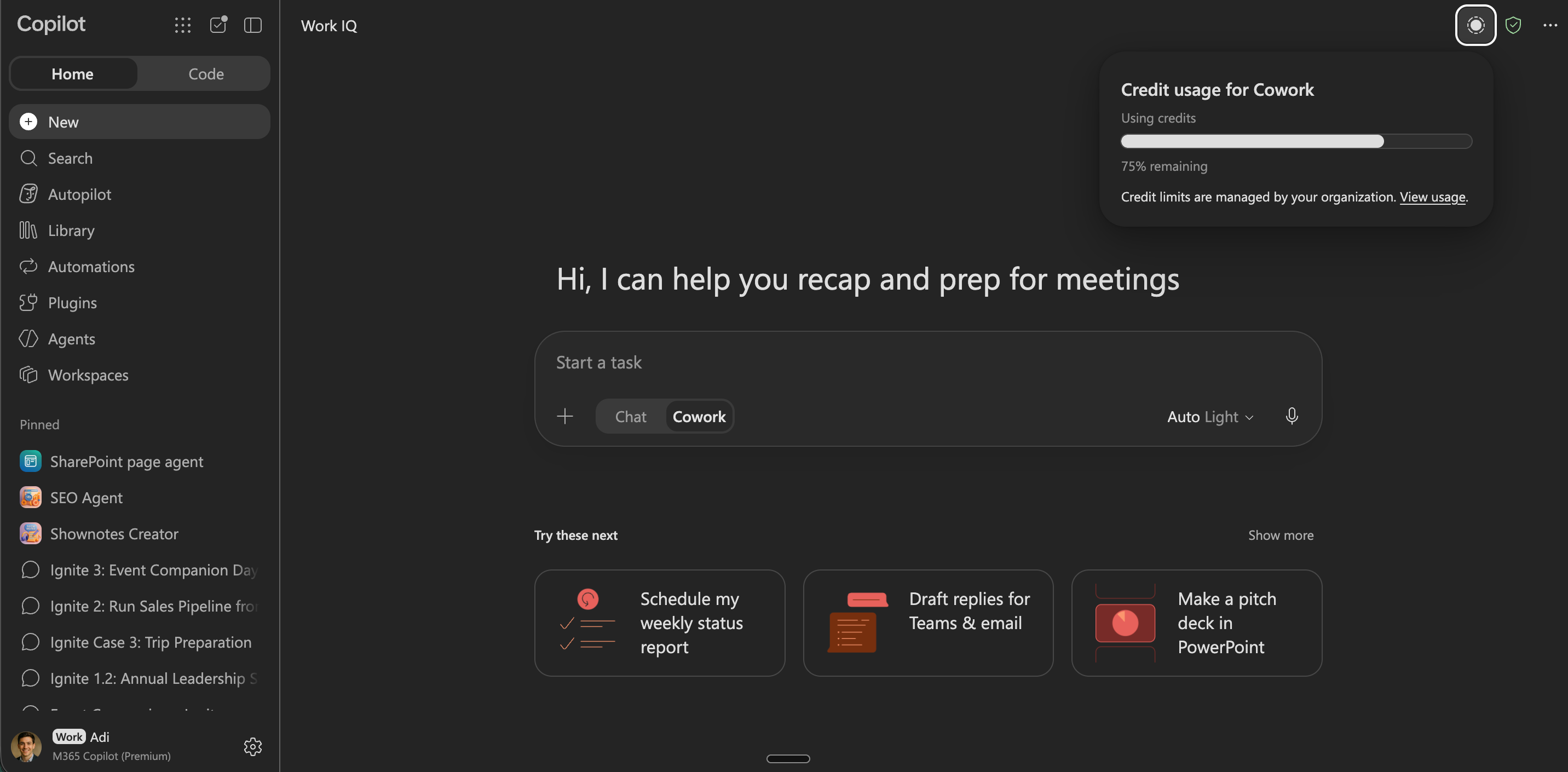
Copilot Cowork is billed per task. Users see their own consumption with /cost and under Usage. Your levers are the model template and the effort level. Auto for the routine. A deliberate choice for the heavy set.
Autopilot (Frontier) is always-on, so the meter runs while you sleep. The user sees no credit count. Without a spending policy that covers it, it doesn’t run at all. Before this reaches your tenant, you want alerts and a named owner.
Copilot Code (Frontier, general availability planned for December according to the Ignite Book of News) has two meters. Building is billed through the policy for Code. Running a published app is billed separately through Copilot Managed Runtime, at 0.1 credits per API call. Microsoft’s own suggestion is a broad runtime policy with a small per-user limit and separate, higher limits for makers. Building is the expensive part.
The Microsoft Copilot harness in Copilot Studio (former known as GitHub Copilot harness) is the most capable harness, and the one where billing starts the moment you start building. Credits cover the tokens, the tools and the harness itself. Testing costs. Evaluations cost. These agents are managed per environment in the Power Platform admin center, with the move to the Microsoft 365 admin center under way, and the agent inventory has a Harness column so you can find them.
Where to start your FinOps journey
Open Copilot > Cost Management in the admin center. Is there a default policy, what is the limit, and who set it?
Check “Auto-apply new services” on every policy and decide it on purpose.
Move your Cowork pilots into their own security group with their own policy, and send the alerts to IT and to Finance.
Name one budget owner in the business for each cohort.
If you are in Frontier, open Business Analytics and read the cost drivers before anything else.
Don’t strive for perfection in a first place
Ignite was about how to govern, control and scale advanced AI. How to hit the next level. And AI spending was omnipresent in the conversations and the sessions.
For three years we argued about whether the Copilot license pays off. That was the easy question, because the price never moved. Instead, the functionality has kept growing ever since.
Now the price moves with every task, and that is good news. A cost per task forces the question we avoided for too long: what was this piece of work worth? Enterprise AI is no longer only an IT or adoption project. It needs FinOps for AI. If you want innovation, put the cost responsibility where the value is created.
But keep in mind, you need to gain experiences, so don’t expect to have the perfect FinOps for AI approach from the very first day. Instead start your journey and adjust whenever needed.
If this helped, share it with the person who owns your Copilot budget.
And tell me in the comments: who pays for the credits in your organisation today?
Let’s Copilot Your Day 🔥
Follow me on LinkedIn to get all Ignite details and upcoming AI updates directly in your feed.
FAQ
AI-generated frequently asked questions
What is FinOps for AI? FinOps for AI is the practice of steering variable AI cost together with the value it creates. It gives business units ownership of their AI budgets, uses spending policies and forecasts to keep consumption predictable, and reviews cost and outcomes in the same meeting.
Which Microsoft Copilot experiences are billed by usage? Everyday AI such as chat and Copilot in the Microsoft 365 apps is included in the Microsoft 365 Copilot license. According to Microsoft, advanced experiences consume Copilot Credits. Current examples are Copilot Cowork, Copilot Code, Autopilot, the Work IQ APIs and agents built in Copilot Studio.
What happens when a user reaches the spending limit? The user loses access to the metered services covered by that policy until credits reset on the first day of the month, unless an administrator raises the limit or approves a request. Capabilities included in the license keep working.
What is Agent 365 Business Analytics? A dedicated app for business leaders, announced at Microsoft Ignite in November 2026 and available through the Frontier preview program. It shows cost, usage, forecasts and estimated value for Microsoft 365 Copilot, usage-based services such as Cowork and agents, and GitHub Copilot in one place.
Do “assisted hours” in Business Analytics equal time saved? No. Microsoft defines assisted hours as the estimated time a person would have needed to complete the work AI performed. The documentation states that they are not actual hours saved and that AI value is not realised financial savings.
Are Copilot Credits and GitHub AI Credits the same? No. They are separate credit systems with separate billing. Business Analytics displays both, but does not combine the totals. Official billing for GitHub Copilot stays on GitHub.com.
More from the archive
Claude in Copilot is Coming to Europe! Model choice and effort level are the two biggest levers on your Cowork credits.
Master the Basics: 5 Stages to Learn Microsoft 365 Copilot Credits only pay off when people know when to ask and when to delegate.
80% Feel More Productive, 37% Can Prove It. The value side of the equation, before the bill arrived.
Take it with you
Cheatsheet: Chat or Cowork? Assignments consume budget, questions don’t have to. The three questions that decide the mode, as a one-pager.
Tactic Board: the Impact Chain The model behind building block 5, tap by tap.