

Today’s episode is a special one. Because I want to zoom out & reflect a bit. A reflection on one of the most underrated topics in the entire AI conversation: the UI for AI (User Interface for Artifical Intelligence) and why it might be the single most important factor in determining whether organizations succeed or fail with Copilot and Agents.
Because here’s what I’ve realized over the past twelve months: we spend so much time talking about what AI can do. But we spend way too little time talking about how we interact with it.
And that “how” has changed more dramatically in the past year than most people realize.
Why UI for AI Matters More Than Most People Think
Let me start with a bold statement:
It’s not about having the best model. The best AI in the world is useless if the interface doesn’t work for people and it’s not integrated in their everyday life.
Think about it. The history of technology is full of examples where the breakthrough wasn’t the technology itself, it was the interface. The mouse made the computer accessible. The touchscreen made the smartphone intuitive. And now, we’re at a similar inflection point with AI.
One year ago, the primary interface for AI in the enterprise was the prompt. You typed a question into a chat window. Copilot answered. If you were good at prompting, you got great results. If you weren’t (and let’s be honest, most people aren’t natural prompt writers) you got average results and moved on.
That was the UI for AI in 2024 and early 2025. And while it worked for early adopters and power users, it left a huge part of the workforce behind.
Switching from Prompt-Based AI to Agentic AI
Now fast forward to February 2026. And this is where it gets really exciting.
Microsoft has fundamentally reimagined how humans and AI work together. The shift can be summarized in one sentence: We’re moving from prompt-based AI to agentic AI. And that changes everything about the user experience.
What does that mean in practice? Let me walk you through the key shifts I’ve observed and experienced firsthand.
Copilot Becomes a Co-Worker in Office Apps through Agent Mode
With Agent Mode, Copilot is no longer a tool you query. It’s a collaborator you work with. In Excel, you can describe an outcome
“Clean this data, identify quarterly trends, and build a visual dashboard”
and Copilot plans, executes, and iterates through multi-step tasks. You watch. You steer. You course-correct.
I just had an use case last week, I have an excel with about 100 formula that links to other tabs in excel. I had to re-link every formula. I thought “okay now show me what you can Agent Mode” and guess what: It was perfect! I saved about 2 hours of work, and it also improved the formular. I was like 😯
In my personal opinion, this is the most important UI shift of the past year. Because it removes the biggest barrier for users: the blank prompt box. Instead of figuring out what to type, you describe where you want to go. And Copilot figures out the path.
That’s a new way of working.
The Facilitator Agent in Microsoft Teams: AI as a Meeting Participant
Here’s another shift that blew my mind the first time I saw it. The Facilitator Agent doesn’t wait for you in a sidebar. It joins your meeting. It drives the agenda. It takes structured notes. It captures action items and creates follow-up tasks.
Think about the UI evolution here. One year ago: you clicked a Copilot button, typed “summarize this meeting,” and got a text block. Today: an agent sits in the meeting, participates proactively, and produces structured outcomes without you lifting a finger. and at the same time it’s your timekeeper that reminds to get an decisions or only 5 minutes left.
From a UX perspective, the interface has become invisible. The AI is just there – doing the work that nobody wants to do but everybody needs done. That’s the vision of agentic AI in action.
Work IQ: The Intelligence Layer That Makes Context the New Interface
And then there’s Work IQ:Source: Pascal Brunner-Nikolla, Campana & Schott Microsoft’s intelligence layer behind Copilot and Agents. This is something that often gets overlooked in the conversation, but I think it’s a game-changer for the user experience.
Work IQ knows what files you’ve been working on, which meetings you attended, who you collaborate with, and what your preferences are. It doesn’t need you to explain everything from scratch. In many ways, context has become the new interface. Copilot meets you where you are, instead of waiting for you to come to it.
For users who always struggled with “I don’t know what to ask” this is the answer. The AI will understands your context and can proactively surface insights, suggestions, and actions.
The Agentic AI Vision: Human-Led, Agent Operatred Organization
Now, let me zoom out even further. Because these individual shifts Agent Mode, the Facilitator, Work IQ are not random feature releases. They’re all part of a much bigger vision that Microsoft calls the Frontier Firm. I elaborated the bigger picture in two separate episode “The Bigger Picture of Ignite Announcements“ and “The Frontier Transformation explained“
If you’re attending a Microsoft event these days, you can be sure that this term will come up. And I think it’s more than just a buzzword. It’s a genuine transformation framework, from Software as a Service approach to Agentic AI.
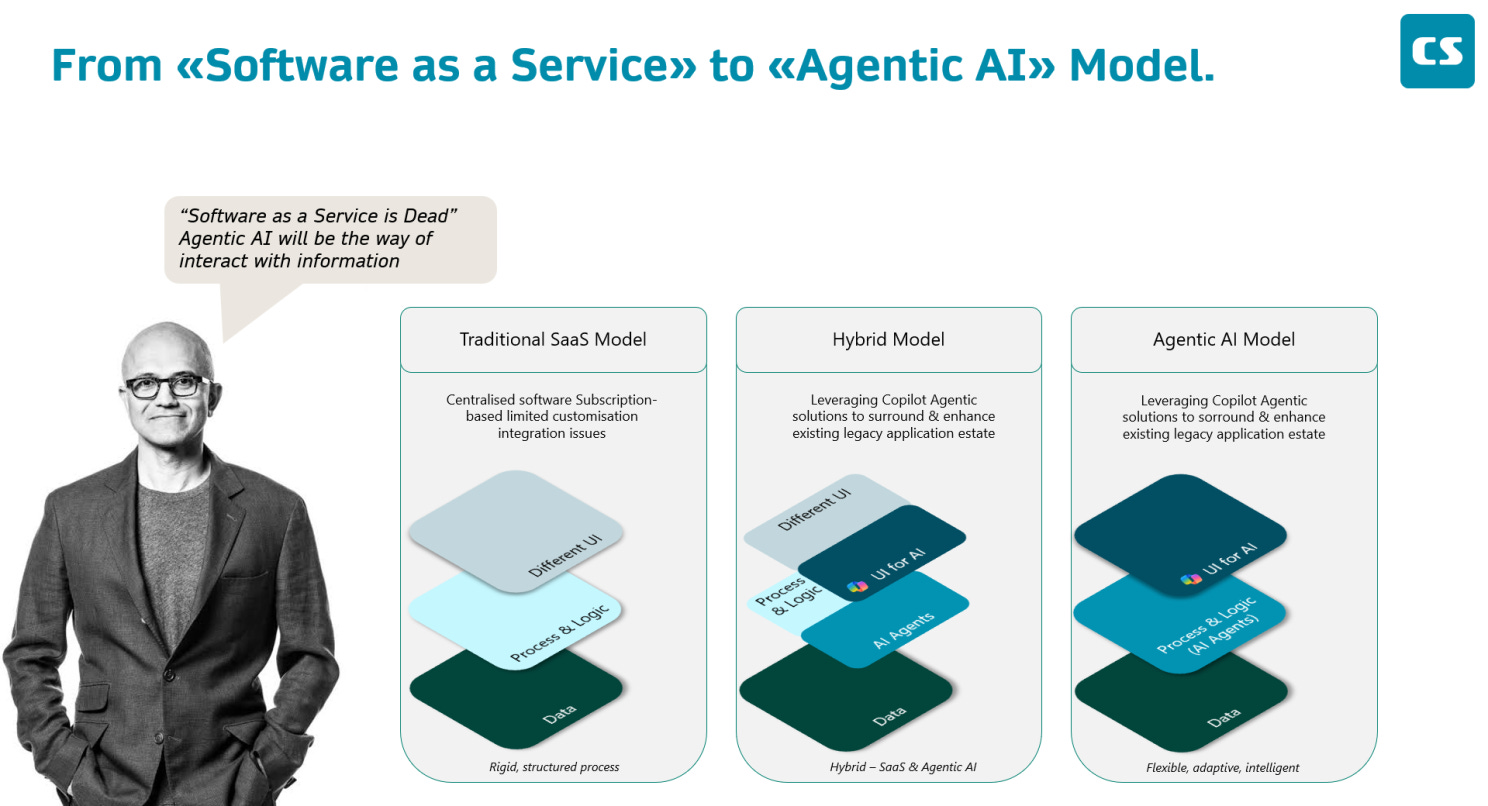
And the UI for AI plays a critical role in the transformation. Especially if you think of the three patterns how Agents become part of our daily work.
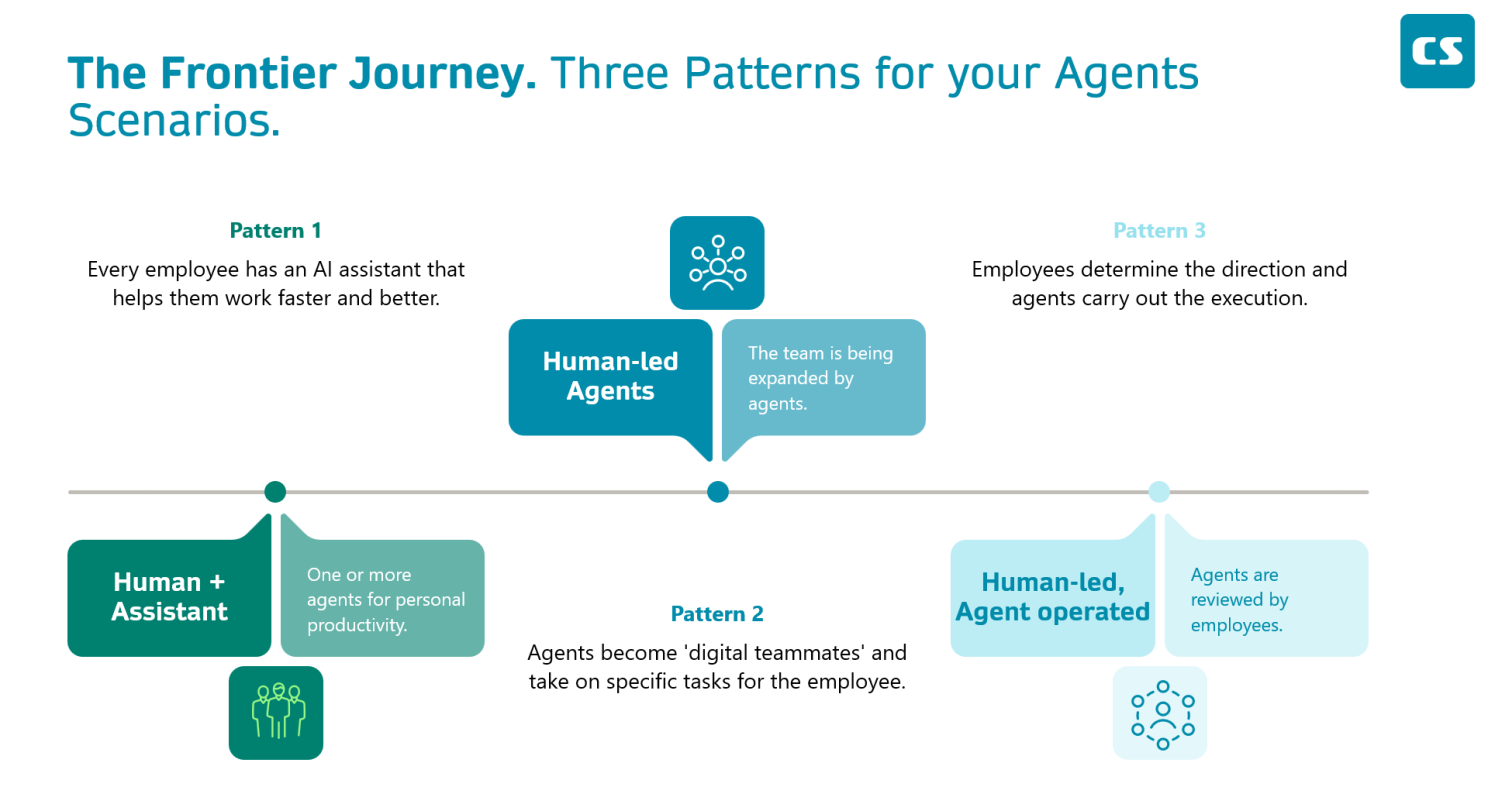
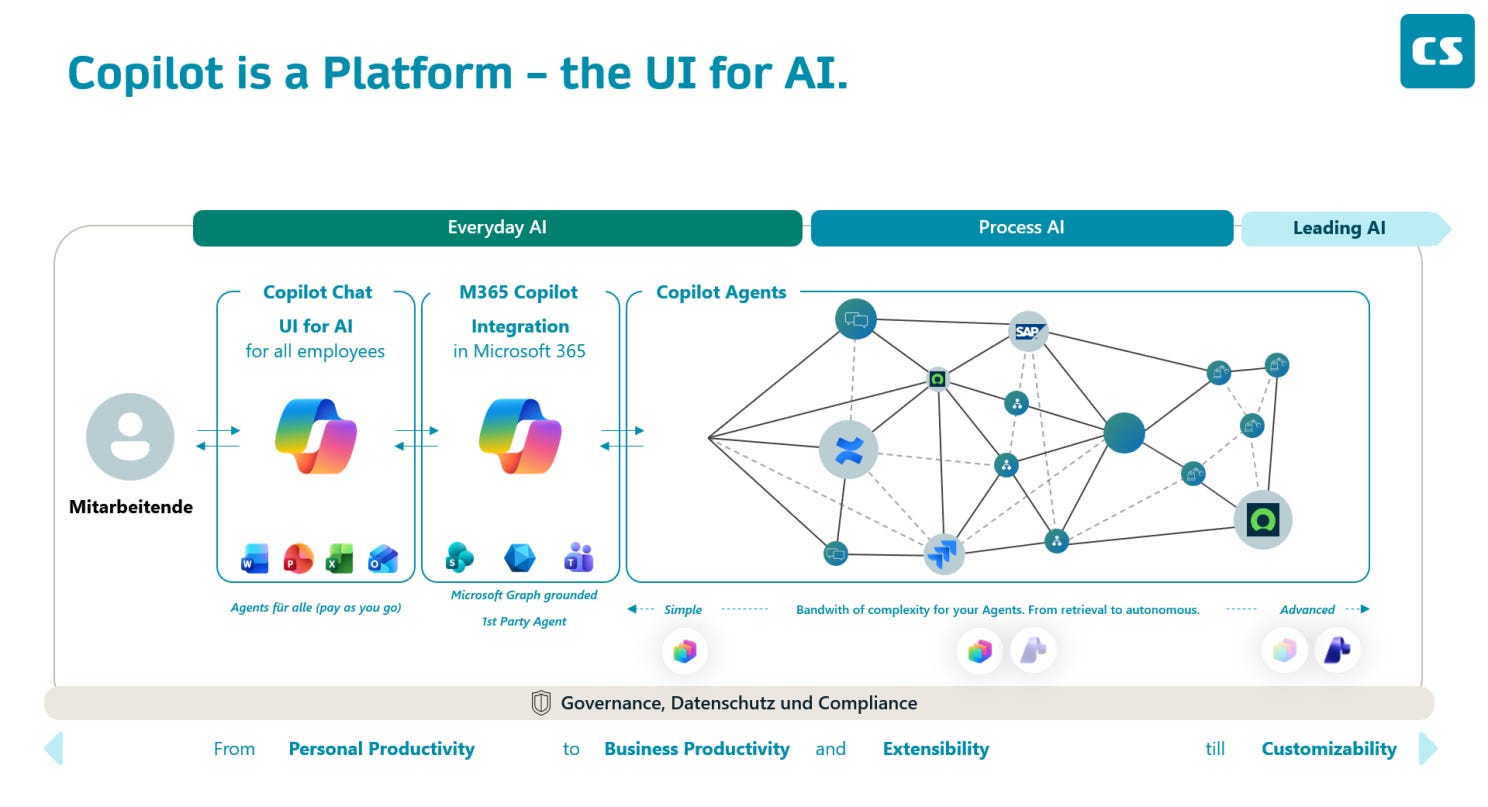
We’re essentially witnessing the evolution of a new human-machine interface paradigm. And it’s happening right in front of us, inside the Microsoft 365 apps we use every day. And everything will be visible in your UI for AI, called “Copilot”. And when we are talking about Agents, it doesn’t really matter if there are M365 Copilot licenses or not, because you can share Agents through pay as you go for every employee.
What This Means for Your Organization
I know what you might be thinking: “Pascal, this sounds great in theory. But what does it mean for my team on Monday morning?”
Fair question. One key element: See Copilot as a Platform, not as another Chatbot. However here’s my honest perspective from working with dozens of enterprise customers on this journey.
Rethink Your Copilot Training: It’s not about Prompts anymore
If your adoption program is still centered around “how to write better prompts,” it’s time to update it. Don’t get me wrong, prompting is still a valuable skill. But the new interaction paradigms like Agent Mode, the Facilitator, context-driven assistance etc. require a different kind of enablement.
Show your users the new Copilot. Role-specific, scenario-based, hands-on. Show your finance team what Agent Mode does in Excel. Show your project managers how the Project Manager Agent & Facilitator transforms their projects. Show your content creators how PowerPoint Agent goes from blank slide to polished deck. And do it alsways in their specific context, generic AI enablement won’t unlock the full potential for your employees.
Embed Agents Into Daily Routines. Not Just into the Tech Stack
As I wrote in my “Day in a Life of“ episode: Copilot Your Day starts with you. Technology evolves, but habits need to evolve with it.
Here’s a personal example. One year ago, I used Copilot mostly after meetings to get a summary. Today, I use Copilot to draft an agenda, I activate the Facilitator Agent before the meeting, let it take structured notes during, and review the output right after. That small change saved me at least 30 minutes per day. And it completely changed how I experience meetings.
Help your users find their version of that shift. It doesn’t have to be dramatic. It just has to be consistent.
The Road Ahead: From Copilot Usage to Frontier Firm Thinking
The UI for AI has evolved more in the past twelve months than in the years before. I think we’ve only just got started, but it’s good enough to continue as it is.
We’re moving from a world where you use AI to a world where you work with AI. From chat-based assistance to agentic collaboration. From typing prompts to orchestrating agents. And the interface, the way we interact with these intelligent systems, will continue to evolve at a pace that most organizations underestimate.
Is everything perfect with the current state? Definitely not. Am I always happy about every interaction? Definitely not, some aspects are still super dynamic. But do I believe that the shift from prompt-based AI to agentic AI is a genuine paradigm shift? Definitely yes.
And I really see it in myself how I have to evolve my work routine. The product gets better day by day. The question is: are we evolving with it? or are we waiting for ‘another better model’?
The organizations that will become Frontier Firms aren’t the ones with the most licenses. They’re the ones that understand the UI for AI evolution, embrace the agentic vision, and help their employees build the new habits. It starts with awareness. And it starts now.
On a Personal Note
Looking back UI for AI was Microsoft’s vision from the beginning. Many people told me that they wouldn’t have a chance to win this competition. I truly believed in it from day one. Microsoft delivered so many new capabilities that even the skeptics rethought their position and embraced the “better together” narrative.
But this only happens if you see the bigger picture and move beyond competing models. Why? Because it doesn’t make sense at all. Of course, Opus 4.6 is amazing, and it wowed me as well. But, let’s be honest; in a few weeks, there will be a better, faster, more advanced model. This is not enterprise thinking, though. You need an overall strategy and approach. Stick to it and play the game. Empower your employees; the models are secondary, especially since Microsoft is adopting a multi-model approach.
What are your thoughts on the UI for AI? 🤓
Let’s Copilot Your Day.