

Last week I had the pleasure the held the keynote at the M365 CON DACH conference. I told the audience how to scale agents with a the Agent Factory: 7-Step Blueprint. Most organizations are still talking about to get the talented people that can build outstanding AI agents (there are still important), but most organization do have a scaling problem. How can you handle 50 or 200 agents requests from your business while ensuring the right technology, guardrails and know what to build and how to prioritize.
After my keynote some asked
That’s great for scaling agent. But how do I know what to pick? Agents, Power Automate Flow, Skills or just Copilot?
And it’s fair and an important aspect. Actually it’s that important, that’s excately the very first step in our blueprint “Intake Funnel”. Because in my experience these days everyone wants to do “something with AI” even though AI isn’t the right solution neither are agents. Sometimes it’s just a Skill.md or even a Power Automate Flow.
So before the factory, here’s waht I should have put on the slide before step 1. There are six options at one time and the questions how to sort and use them.
time to celebrate: I am top-100 LinkedIn Creators (#96) in Switzerland and #1 in AI Education according to Favikon. Show some excitement and celebrate with me
The seven ways to do the magic
A prompt
You type it, Copilot answers, the chat ends. Nothing to build, nothing to file, nobody to own it.
Right when the work is a one-off, or when you’re still working out what a good result looks like. Wrong when you notice you’ve typed the same brief three times. Most work belongs here, and it should stay here.
Owner: you.
Bill: your Copilot licence.
A skill
A small text file with a name, a description of when to use it, and the method in plain text. Copilot applies it on its own whenever a request matches. In Cowork the file lives in your OneDrive, and Cowork now scores every skill you create from 0 to 100 on trigger clarity, instruction specificity, scope and robustness.
Right when you repeat the work, in the same order, with a quality bar, and when a colleague should get the same result without asking you. Wrong when written too early: a skill freezes a method, and a method you’re still changing isn’t ready to be frozen.
Owner: you, or whoever you share it with, and that’s the catch. Microsoft doesn’t validate skills users write. A shared skill needs a name, a date and one place where the current version lives.
Bill: usage.
A Cowork task
Your work, running without you. Cowork can now run a task on a schedule or in response to an event, a matching email arriving, for example, and do the job with no click from you. A Cowork task can use your skills, so the skill is the method and the task is the trigger.
Right when the work needs judgement, is yours, and should happen while you’re not there. Wrong when the result has to be identical every run, which brings us to flows, or when other people should trigger it, which brings us to agents.
Owner: you.
Bill: Copilot Credits - usage based
An Agent Builder agent
An agent you describe in natural language inside Microsoft 365 Copilot, grounded in content you already have: a SharePoint library, a set of mails, a team’s files. It answers questions for a team. Microsoft’s own guidance: use Agent Builder when you want to quickly create an agent for yourself or a small team from natural language and existing content. It’s included in the Microsoft 365 Copilot licence, and if you outgrow it you can copy the agent to Copilot Studio.
Right when the agent answers rather than acts, and the users already have Copilot. Wrong when it needs to create a record, call a system, or reach people outside your tenant; Agent Builder has no actions for that.
Owner: the person who built it, visible to admins.
Bill: covered by the licence.
A Copilot Studio agent
A managed product. It can act in systems, run multi-step workflows, use custom integrations, serve a department, the whole organisation or external customers, and it lives under proper lifecycle management. Microsoft’s line: choose Copilot Studio for a broader audience, for advanced capabilities like multi-step workflows or custom integrations, or when you need more control over deployment and management.
Right when the agent has to do something, not just say something, or when the audience is broad. Wrong when Agent Builder would have answered the question in an afternoon.
Owner: a named team, with ALM.
Bill: Included with License or Copilot credits - usage based (depending on Harness)
A Foundry agent
It’s the Code-first approach. Microsoft Foundry, renamed from Azure AI Foundry at Ignite 2025, is where a developer team builds an agent with full control: pick the model from the catalogue, write the tools, own the evaluation, run it inside your own Azure networking. Microsoft’s own IT organization describes the Foundry Agent Service as a code-first platform for building and operating custom agents with full control over models, orchestration and runtime, built for engineering-heavy scenarios.
Right when the agent needs control that low-code can’t give: model choice (more than 1000 models available), custom orchestration, private networking, engineering-grade evaluation, or when it’s part of a product rather than a business workflow. Wrong when the need still lives inside Microsoft 365 and business workflows; then Copilot Studio gets you there faster, under governance you already have. The two aren’t rivals either. A common pattern is Copilot Studio as the front door and Foundry behind it for the heavy logic.
Owner: an engineering team, on Azure.
Bill: Azure consumption. (Pay-as-you-Go)
A flow
Power Automate. A fixed sequence, the same input produces the same output, every run, with a run history someone can check afterwards. Microsoft describes both topics and agent flows as deterministic pathways: same inputs, same output, reliable and predictable. That property is what you’re buying.
Right whenever an approval, a number, a signature or an audit depends on the outcome. No language model guarantees you the same result twice, and for this class of work “usually the same” is not a feature. An agent can still sit in front of the flow and handle the conversation; the flow handles the audited step. That’s the clean pattern, not an exception.
One trap, and it’s a CIO-level one. Copilot Studio ships agent flows, and the tempting move is to build the flow inside the agent. Agent flows are billed through Copilot Studio by consumption, no Power Automate licence needed, and they can be reused across several agents. But unlike cloud flows, they can’t be copied or shared, have no co-owners, and can’t grant run-only permissions.
Owner: Power Platform governance, environments, DLP, solutions.
Bill: Included in your M365 License, for some actions usage based
Hey I’m Pascal. I post daily insights on AI, Agents + Copilot. Follow me on LinkedIn to stay up to date.
Your Decision Tree to choose the right approach
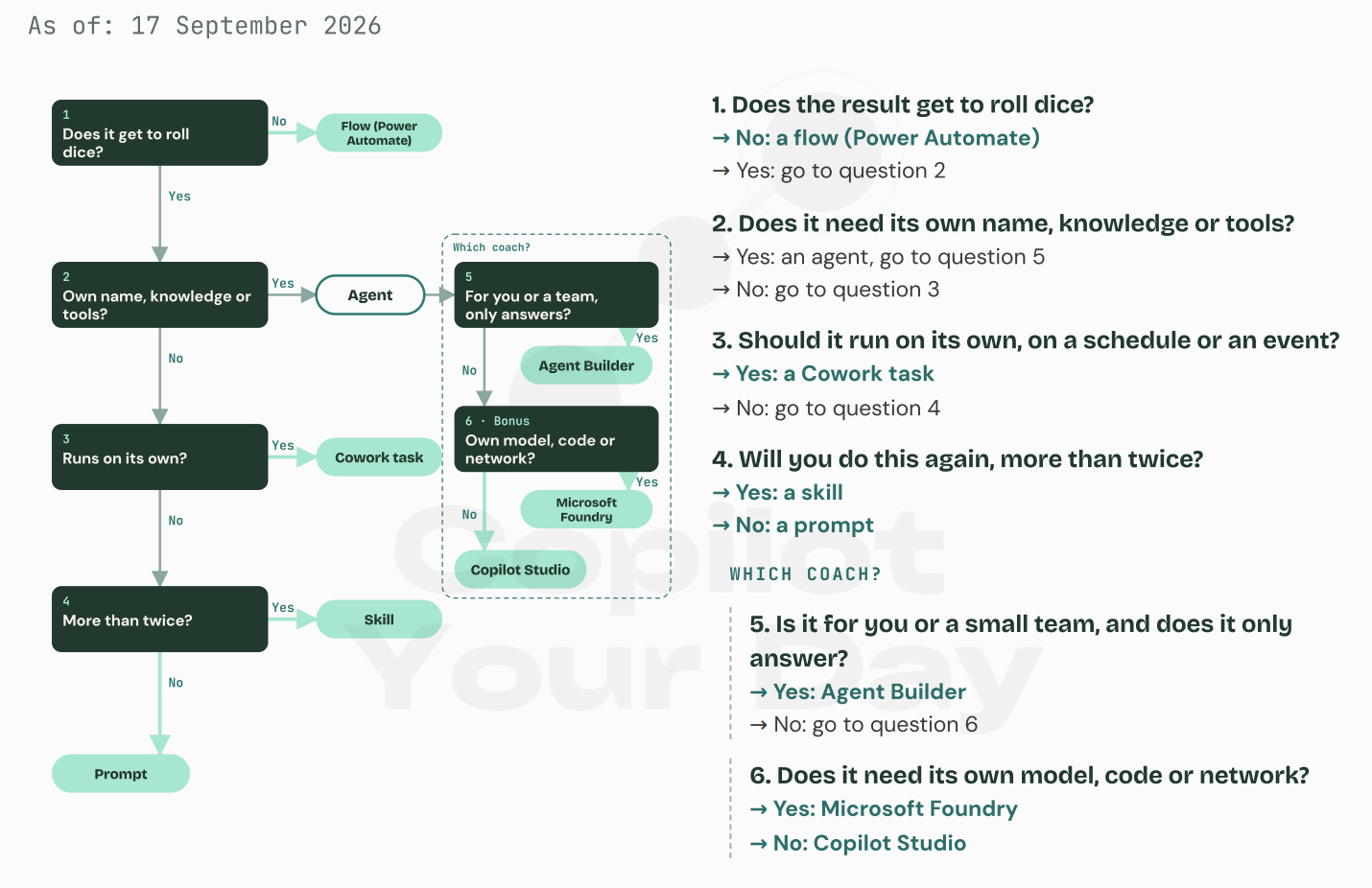
When should you choose what? Good questions! You’ve read the seven options, so the decision tree is short, but the order matters! If you don’t want to read through every question and the scroll up and down: I’ve built the decision tree on my website, including a new cheatsheet.
1. Does the result get to roll dice?
No: a flow (Power Automate).
Yes: go to question 2.
Dice means the same question can get a slightly different answer. Normal for a summary. Not for an approval, a figure or an audit. Note that this is the one question where “no” is the result; from here on, “yes” ends the tree.
2. Does it need its own name, knowledge or tools?
Yes: it’s an agent. Go to question 5.
No: go to question 3.
3. Should it run on its own, on a schedule or an event?
Yes: a Cowork task.
No: go to question 4.
4. Will you do this again, more than twice?
Yes: a skill.
No: a prompt.
--The last two questions are only for those who answered yes to question 2. In gym terms: which coach.
5. Is it for you or a small team, and does it only answer?
Yes: Agent Builder.
No: go to question 6.
6. Bonus. Does it need its own model, code or network?
Yes: Microsoft Foundry.
No: Copilot Studio.
Question 2 is the one people argue about, so one sentence on it: the line between a skill and an agent isn’t who uses it. Skills can be shared with the whole organisation, and an agent can be built for one person. The line is whether it needs a thing of its own, with a name, its own knowledge and its own tools, or whether it just tells the Copilot you already have how to work.
Agents are not your solution for everything
In my opinion this is one of the most important parts. Every organization is now screaming “WE NEED AI!”. But as you’ve read, AI or Agents is not always the best solution. You need to build this decision tree with a cheapest to expensive logic. and of course if you can just run a script or an automation, do so!
The cheapest answer that works, wins. When in doubt, step back rather than up.
That’s your thinking model: Prompts are reps. Skills are technique. Everything above that is equipment and equipment needs a maintenance plan.
If I am in charge of AI, what does this mean?
Back to the Agent Factory. The Blueprint starts at Step 1, with the intake step. However this clarity on triage, is actually Step 0. It is the basic to can decide at step 1, it’s like your filter for all the use cases. Run every agent-candidate through the tree before you go to step 2. Spoiler: Many use cases will never made it to the Agent development team, however it will pop out as s Skill, or Cowork task or just as a super uncool Power Automate flow, but trust me it does its job.
And as said in my session, it’s not a failure if you decide not to build another agents, neither it’s a failure when you have only 12 agents instead of 60. Focus on the impact, rather in the amount of agents.
One particular aspect you can’t miss: Read the six variaties again and have a look at the owners and the bill. Especially with the new Github Copilot harness in Copilot Studio, it’s more important than ever to have a clear picture on your Copilot Credits consumption. And this doesn’t mean to just block everything and don’t allow to consume Copilot Credits. It’s actually the other way around, I am a huge fan of the latest capabilities. But of course we need to built this new skill (and I mean a human skill, not Cowork Skills 😁) to learn when we go to Cowork and when using the standard capabilities.
So now it’s your job to doublecheck your governance model ask where you start seeing things. In most organizations I see it starts with Copilot Studio, but the rest stays invisible. Skills people share the Cowork tasks that run every morning and the amount of agents that your organization has already built with Agent Builder. That’s also why many organizations start with Agent 365. Because this is excatly the tooling that helps you to support your operating model.
Once again: Access isn’t fitness.
Be prepared to scale and build a solid foundation
The Agent Factory itself isn’t rocket science, however it’s the most critical part to be prepared to scale. And an Agent Factory doesn’t only build agents, they’re responsible for an operating system, delivering the right guidance, ensuring a proper governance and make it reusable and scalable.
And the question I’ve got after presenting this operating model is the perfect example what you need to have in mind: Employees need guidance and clarity. Once they understand how it works and when to use what, you can build on that. But first of all, you need to have this clarity in your agent factory team.